SmolVLA: VLA for Everyone, Not Just Labs
If you've read our LeRobot v0.5 overview, you know that VLA (Vision-Language-Action) models are transforming how we program robots. But there's a major problem: most VLA models require data center GPUs — A100, H100 — for both training and inference. This limits VLA to large companies and well-funded research labs.
SmolVLA changes the picture entirely. With only 450M parameters, SmolVLA runs on RTX 3060 — the most popular GPU on the market. You can fine-tune it on a gaming laptop, deploy on Jetson Orin, and achieve 78% real-world success rate on manipulation tasks.
In this tutorial, we'll walk through everything step by step: understanding the architecture, collecting data, fine-tuning the model, and deploying on a real robot.

What is SmolVLA?
Architecture Overview
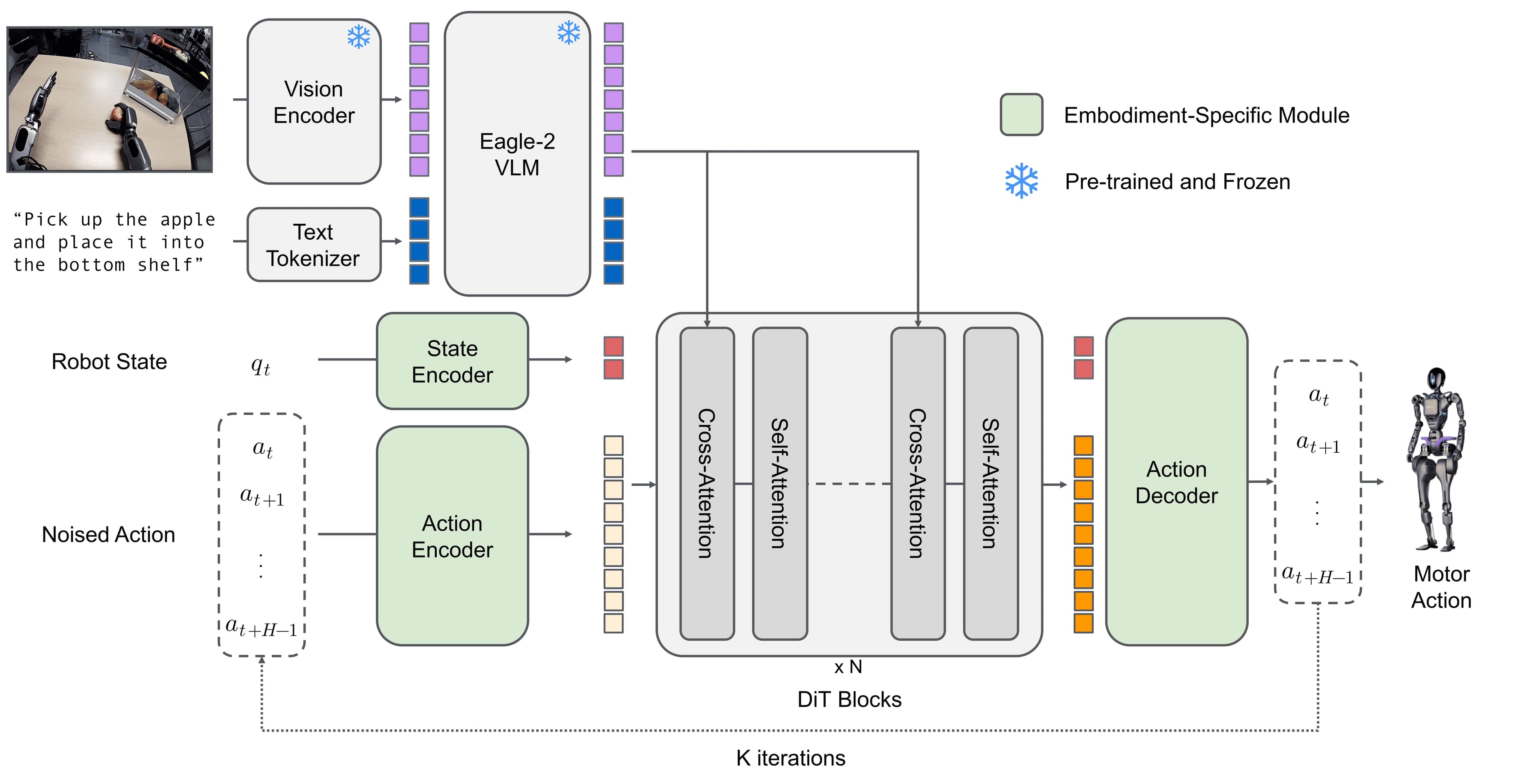
SmolVLA is the most compact VLA model currently capable of real-world performance. The architecture consists of three main components:
1. SigLIP Vision Encoder (~100M params)
- Processes camera images
- Output: visual tokens representing the scene
- Key feature: only 64 tokens per frame (vs 1024 in other VLAs) thanks to visual token reduction
2. SmolLM2 Language Decoder (~250M params)
- Processes text instructions (e.g., "pick up the red cube")
- Combines visual tokens and language tokens
- Output: latent representations for the action expert
3. Flow Matching Action Expert (~100M params)
- Receives latent representations from language decoder
- Generates continuous robot actions via iterative denoising
- Output: action chunk (e.g., 10 actions, each containing joint positions + gripper state)
Total: ~450M parameters — 10x smaller than OpenVLA (7B) and 6x smaller than Pi0 (3B).
Why Is SmolVLA Small Yet Effective?
The secret lies in three key techniques:
Layer Skipping: Instead of passing every visual token through all transformer layers, SmolVLA only passes through selected layers. This reduces computation without significantly affecting accuracy.
Visual Token Reduction: Traditional VLAs encode each frame into 1024 tokens — very expensive for the attention mechanism. SmolVLA compresses this to 64 tokens using learned pooling, reducing computation 16x in attention layers.
Flow Matching over Diffusion: The action expert uses flow matching — a simpler and more efficient version of the diffusion process, requiring fewer denoising steps (5-10 steps instead of 50-100).
Comparison with Other VLA Models
| Model | Params | Min GPU | Real-world Success | Inference Speed |
|---|---|---|---|---|
| OpenVLA | 7B | A100 80GB | ~70% | ~2 Hz |
| Pi0 | 3B | A100 40GB | ~85% | ~5 Hz |
| Pi0-FAST | 3B | RTX 4090 | ~82% | ~25 Hz |
| SmolVLA | 450M | RTX 3060 | 78% | ~15 Hz |
SmolVLA sacrifices a bit of accuracy (78% vs Pi0's 85%) in exchange for the ability to run on commodity hardware — a very worthwhile tradeoff for most applications.
Step 1: Install LeRobot and SmolVLA Dependencies
System Requirements
- Python 3.12+ (required for LeRobot v0.5)
- CUDA 12.1+ (or ROCm 6.0+ for AMD GPUs)
- GPU: minimum 6GB VRAM for inference, 12GB+ for training
- RAM: 16GB+ (32GB recommended)
Installation
# Create virtual environment
python3.12 -m venv smolvla-env
source smolvla-env/bin/activate

# Clone LeRobot
git clone https://github.com/huggingface/lerobot.git
cd lerobot

# Install with SmolVLA extras
pip install -e ".[smolvla]"

# Verify installation
python -c "from lerobot.policies import SmolVLAPolicy; print('SmolVLA OK')"
The [smolvla] package will additionally install transformers>=5.0, accelerate, and necessary dependencies for SigLIP and SmolLM2.
Check GPU
python -c "
import torch
print(f'CUDA available: {torch.cuda.is_available()}')
print(f'GPU: {torch.cuda.get_device_name(0)}')
print(f'VRAM: {torch.cuda.get_device_properties(0).total_mem / 1e9:.1f} GB')
"
Step 2: Collect Dataset
Why Data Matters More Than the Model
A critical lesson from the LeRobot community: data quality > model size. SmolVLA at 450M params with 100 high-quality episodes will outperform OpenVLA at 7B with 50 low-quality episodes.
This means you should spend 60-70% of your time on data collection and only 30-40% on training/tuning.
Collecting Data with LeRobot
If you have a real robot (SO-100, SO-101, or compatible), use lerobot-record:
# Record 50 episodes for pick-and-place task
lerobot-record \
  --robot.type=so100 \
  --repo_id=YOUR_USERNAME/pick_place_cube \
  --num_episodes=50 \
  --fps=30
For a deeper understanding of the data collection process, refer to our teleop and data collection guide in this series.
Tips for High-Quality Data
Diverse starting positions: Place the object at many different positions. If you only place the cube in the center of the table, the robot will only learn to pick from the center.
Good: 50 episodes, 10 different cube positions, 5 episodes per position
Bad: 50 episodes, cube always in the same spot
Diverse speeds: Teleop at a natural pace, not too fast or too slow. Avoid pausing mid-action — if you pause, the robot learns that "standing still" is valid behavior.
Check frame rate: Ensure you record at a stable 30 FPS. Unstable FPS creates temporal inconsistency in training.
Minimum quantities:
- Simple task (pick-and-place 1 object): 50 episodes
- Complex task (stacking, sorting): 100-200 episodes
- Task with many variations: 10 episodes per variation (e.g., 5 object types x 10 episodes = 50)
Using Existing Datasets
If you don't have a robot, you can fine-tune on existing datasets:
# Use SmolVLA's reference dataset
lerobot-train \
  --policy.path=lerobot/smolvla_base \
  --dataset.repo_id=lerobot/svla_so100_pickplace \
  --training.batch_size=64 \
  --training.steps=20000
The lerobot/svla_so100_pickplace dataset contains ~200 pick-and-place episodes on SO-100, pre-formatted for SmolVLA.

Step 3: Fine-tune SmolVLA from Pretrained
Why Fine-tune Instead of Training from Scratch?
The SmolVLA base model (lerobot/smolvla_base) has been pretrained on thousands of hours of robot data, including:
- Bridge V2 dataset
- DROID dataset
- Open-X Embodiment data
- And many more datasets
The pretrained model has already learned general manipulation skills: how to approach objects, when to close the gripper, how to move smoothly. Fine-tuning only needs to teach it your specific task and specific embodiment.
This reduces required episodes from thousands to 50-100 and training time from days to a few hours.
Basic Fine-tuning Command
lerobot-train \
  --policy.path=lerobot/smolvla_base \
  --dataset.repo_id=YOUR_USERNAME/pick_place_cube \
  --training.batch_size=64 \
  --training.steps=20000 \
  --training.lr=1e-5 \
  --training.save_freq=5000
Parameter Explanation
--policy.path: Path to pretrained model on Hugging Face Hub--dataset.repo_id: Your dataset (or public dataset)--training.batch_size: Samples per batch. Reduce if running out of VRAM:- A100 80GB:
batch_size=128 - RTX 4090 24GB:
batch_size=64 - RTX 3090 24GB:
batch_size=32 - RTX 3060 12GB:
batch_size=16
- A100 80GB:
--training.steps: Total training steps. 20000 is a good starting point for 50-100 episodes--training.lr: Learning rate.1e-5is a safe default for fine-tuning--training.save_freq: Save checkpoint every N steps
Estimated Training Times
| GPU | Batch Size | 20k Steps | 50k Steps |
|---|---|---|---|
| A100 80GB | 128 | ~2 hours | ~5 hours |
| RTX 4090 | 64 | ~4 hours | ~10 hours |
| RTX 3090 | 32 | ~6 hours | ~15 hours |
| RTX 3060 | 16 | ~10 hours | ~25 hours |
Google Colab
If you don't have a powerful GPU, SmolVLA can be trained on Google Colab Pro (A100):
# In Colab notebook
!pip install lerobot[smolvla]

# Login Hugging Face
from huggingface_hub import login
login()

# Train
!lerobot-train \
  --policy.path=lerobot/smolvla_base \
  --dataset.repo_id=lerobot/svla_so100_pickplace \
  --training.batch_size=64 \
  --training.steps=20000 \
  --training.output_dir=/content/outputs
Monitoring Training
LeRobot v0.5 logs training metrics to Weights & Biases (if installed):
pip install wandb
wandb login

lerobot-train \
  --policy.path=lerobot/smolvla_base \
  --dataset.repo_id=YOUR_USERNAME/pick_place_cube \
  --training.batch_size=64 \
  --training.steps=20000 \
  --training.wandb.enable=true \
  --training.wandb.project=smolvla-finetune
Monitor action_loss — it should gradually decrease and stabilize. If loss plateaus early (before 10k steps), you may need more data or a higher learning rate.
Step 4: Evaluate on Real Robot
Deploying the Policy
After training, you can deploy the model directly:
# Run policy on real robot
lerobot-record \
  --robot.type=so100 \
  --policy.path=outputs/train/smolvla/checkpoints/last/pretrained_model \
  --repo_id=YOUR_USERNAME/eval_results \
  --num_episodes=10
This command will:
- Load the trained model
- Run inference loop: camera -> model -> robot actions
- Record results into a dataset (for later review)
Evaluate in Simulation
To test before deploying on a real robot:
lerobot-eval \
  --policy.path=outputs/train/smolvla/checkpoints/last/pretrained_model \
  --env.type=libero \
  --env.task=libero_object \
  --eval.num_episodes=50
Key Metrics
- Success rate: Task completion rate (target >70%)
- Completion time: Average time to complete (target <15 seconds for pick-and-place)
- Smoothness: Trajectory without jitter or sudden movements
Advanced Features
Async Inference: 30% Faster
SmolVLA supports asynchronous inference — while the robot executes actions from the current chunk, the model runs inference for the next chunk in the background:
lerobot-train \
  --policy.path=lerobot/smolvla_base \
  --policy.async_inference=true \
  --dataset.repo_id=YOUR_USERNAME/pick_place_cube
Result: 30% reduction in latency, 2x throughput increase. Especially useful on slower hardware (RTX 3060, Jetson Orin).
Visual Token Reduction Details
By default, SmolVLA uses 64 visual tokens per frame. You can adjust:
# Fewer tokens = faster, but loses detail
lerobot-train \
  --policy.path=lerobot/smolvla_base \
  --policy.num_visual_tokens=32 \
  --dataset.repo_id=YOUR_USERNAME/dataset

# More tokens = slower, but more detailed (for precision tasks)
lerobot-train \
  --policy.path=lerobot/smolvla_base \
  --policy.num_visual_tokens=128 \
  --dataset.repo_id=YOUR_USERNAME/dataset
Rule of thumb: Use 64 tokens for most tasks. Increase to 128 if the task requires fine-grained spatial reasoning (e.g., inserting a peg into a hole).
Multi-camera Support
SmolVLA supports multiple cameras:
lerobot-train \
  --policy.path=lerobot/smolvla_base \
  --policy.camera_names=["top","wrist"] \
  --dataset.repo_id=YOUR_USERNAME/dataset
Tip: A wrist camera significantly improves grasping accuracy. If you only have one camera, prioritize wrist camera over top-down camera.
Common Troubleshooting
CUDA Out of Memory
torch.cuda.OutOfMemoryError: CUDA out of memory
Solution: Reduce batch_size. If batch_size=8 still causes OOM, try:
lerobot-train \
  --policy.path=lerobot/smolvla_base \
  --training.batch_size=4 \
  --training.gradient_accumulation_steps=8 \
  --dataset.repo_id=YOUR_USERNAME/dataset
gradient_accumulation_steps=8 with batch_size=4 gives effective batch size = 32 without extra VRAM.
Loss Not Decreasing
If loss plateaus from the start:
- Check dataset: Ensure correct format (
lerobot-check-dataset --repo_id=YOUR/dataset) - Increase learning rate: Try
lr=5e-5instead of1e-5 - Check task description: SmolVLA uses language conditioning — task descriptions must be clear and consistent
Jerky Robot Actions
If the robot moves jerkily during inference:
- Enable action smoothing:
--policy.temporal_smoothing=true - Increase chunk_size:
--policy.chunk_size=20(default 10) - Check FPS: inference must run at >=10 Hz
Conclusion
SmolVLA is a breakthrough in democratizing robot AI. For the first time, you can train a VLA model that works in the real world without needing data center GPUs. The complete pipeline — from data collection, fine-tuning, to deployment — all runs on hardware that any student or hobbyist can own.
However, remember: data quality is the decisive factor. Spending time collecting diverse, consistent, and sufficient data will yield much better results than focusing solely on hyperparameter tuning.
For a deeper theoretical foundation, read our articles on PSi0: Architecture Overview and Diffusion Policy deep dive. When you're ready for a more powerful model, the next post covers Pi0-FAST — a 5x faster autoregressive VLA.
Related Posts
- LeRobot v0.5: What's New — Complete overview of LeRobot's biggest update
- VLA Models: From Theory to Practice — VLA theoretical foundations before fine-tuning
- Teleop and Data Collection — Detailed guide to collecting high-quality datasets