What is ROS 2?
ROS 2 (Robot Operating System 2) is open-source framework completely redesigned from ROS 1, targeting commercial and industrial robot applications. Unlike ROS 1 which depends on central master node (roscore), ROS 2 uses DDS (Data Distribution Service) as middleware, enabling true distributed architecture.
Simple analogy: if ROS 1 is like telephone system needing central switchboard, ROS 2 is like internet — each node can communicate directly with others without needing "switchboard".

Why Switch to ROS 2?
1. Real-Time Support
ROS 2 built on DDS with flexible QoS (Quality of Service). Allows configuring reliability, latency, bandwidth for each topic separately — critical for industrial robot control.
Real example: When controlling welding robot arm, encoder data must arrive within 1ms. With ROS 2, set /joint_states topic to QoS profile RELIABLE + KEEP_LAST(1) for guaranteed delivery. Meanwhile, camera topic can use BEST_EFFORT since dropping few frames won't hurt.
2. Built-in Security
ROS 2 integrates SROS2 (Secure ROS 2) with TLS/DTLS encryption for inter-node communication. In factory network, this is mandatory when robots communicate over internal network.
Basic security setup:
# Create keystore and certificates for nodes
ros2 security create_keystore ~/sros2_keystore
ros2 security create_enclave ~/sros2_keystore /my_robot/camera_node
ros2 security create_enclave ~/sros2_keystore /my_robot/motor_node

# Activate security when running
export ROS_SECURITY_KEYSTORE=~/sros2_keystore
export ROS_SECURITY_ENABLE=true
export ROS_SECURITY_STRATEGY=Enforce
3. Multi-Platform Support
ROS 2 officially supports Ubuntu, Windows, and macOS. Develop on Windows laptop, deploy to ARM64 robot on Ubuntu without code changes. Major advantage over ROS 1 which only works well on Ubuntu.
4. Lifecycle Node Management
ROS 2 introduces Lifecycle Nodes — managing node state (Unconfigured → Inactive → Active → Finalized). Very important in production: configure all nodes beforehand, then activate simultaneously when robot ready.
from rclpy.lifecycle import Node as LifecycleNode

class CameraNode(LifecycleNode):
    def __init__(self):
        super().__init__('camera_node')

    def on_configure(self, state):
        # Initialize camera driver, load calibration
        self.camera = cv2.VideoCapture(0)
        self.get_logger().info('Camera configured')
        return TransitionCallbackReturn.SUCCESS

    def on_activate(self, state):
        # Start publishing frames
        self.timer = self.create_timer(0.033, self.publish_frame)
        return TransitionCallbackReturn.SUCCESS

    def on_deactivate(self, state):
        # Stop publishing, keep camera open
        self.destroy_timer(self.timer)
        return TransitionCallbackReturn.SUCCESS
Basic Architecture
Typical ROS 2 system has 4 communication primitives:
| Primitive | Description | Use Case |
|---|---|---|
| Topic | Async Pub/Sub | Sensor data, robot state |
| Service | Sync Request/Response | Get parameter, trigger action |
| Action | Goal + Feedback + Result | Navigation, arm movement |
| Parameter | Key-value runtime config | Tune PID, change speed |
Graph Concept
Each ROS 2 node is independent process. They communicate over DDS network without knowing each other's location — same machine or different machines work identically. Called location transparency.
# View entire current graph
ros2 node list
ros2 topic list
ros2 topic echo /scan  # See LiDAR data real-time

Getting Started with ROS 2 Humble
ROS 2 Humble Hawksbill is LTS version (support until 2027), suitable for production projects. Installation on Ubuntu 22.04:
# Add ROS 2 repository
sudo apt update && sudo apt install -y software-properties-common
sudo add-apt-repository universe
sudo curl -sSL https://raw.githubusercontent.com/ros/rosdistro/master/ros.key -o /usr/share/keyrings/ros-archive-keyring.gpg
echo "deb [arch=$(dpkg --print-architecture) signed-by=/usr/share/keyrings/ros-archive-keyring.gpg] http://packages.ros.org/ros2/ubuntu $(. /etc/os-release && echo $UBUNTU_CODENAME) main" | sudo tee /etc/apt/sources.list.d/ros2.list > /dev/null

# Install
sudo apt update
sudo apt install ros-humble-desktop

# Source environment
echo "source /opt/ros/humble/setup.bash" >> ~/.bashrc
source ~/.bashrc
Create Workspace and First Package
# Create workspace
mkdir -p ~/ros2_ws/src
cd ~/ros2_ws/src

# Create Python package
ros2 pkg create --build-type ament_python my_robot_pkg --dependencies rclpy std_msgs

# Build
cd ~/ros2_ws
colcon build --symlink-install

# Source workspace
source install/setup.bash
Simple Publisher Node
# my_robot_pkg/my_robot_pkg/sensor_publisher.py
import rclpy
from rclpy.node import Node
from std_msgs.msg import Float32

class SensorPublisher(Node):
    def __init__(self):
        super().__init__('sensor_publisher')
        self.publisher = self.create_publisher(Float32, '/temperature', 10)
        self.timer = self.create_timer(1.0, self.timer_callback)
        self.get_logger().info('Sensor publisher started')

    def timer_callback(self):
        msg = Float32()
        msg.data = self.read_temperature()
        self.publisher.publish(msg)

    def read_temperature(self):
        # Read from real sensor or simulate
        return 25.5

def main():
    rclpy.init()
    node = SensorPublisher()
    rclpy.spin(node)
    node.destroy_node()
    rclpy.shutdown()
ROS 2 Ecosystem
Real power of ROS 2 lies in package ecosystem:
- Nav2 (Navigation2): Complete navigation stack for AMR — SLAM, path planning, obstacle avoidance
- MoveIt2: Motion planning for robot arm — inverse kinematics, collision detection, trajectory optimization
- ros2_control: Hardware abstraction layer — write controller once, run on any robot
- Gazebo / Isaac Sim: Simulation — test code before running on real robot
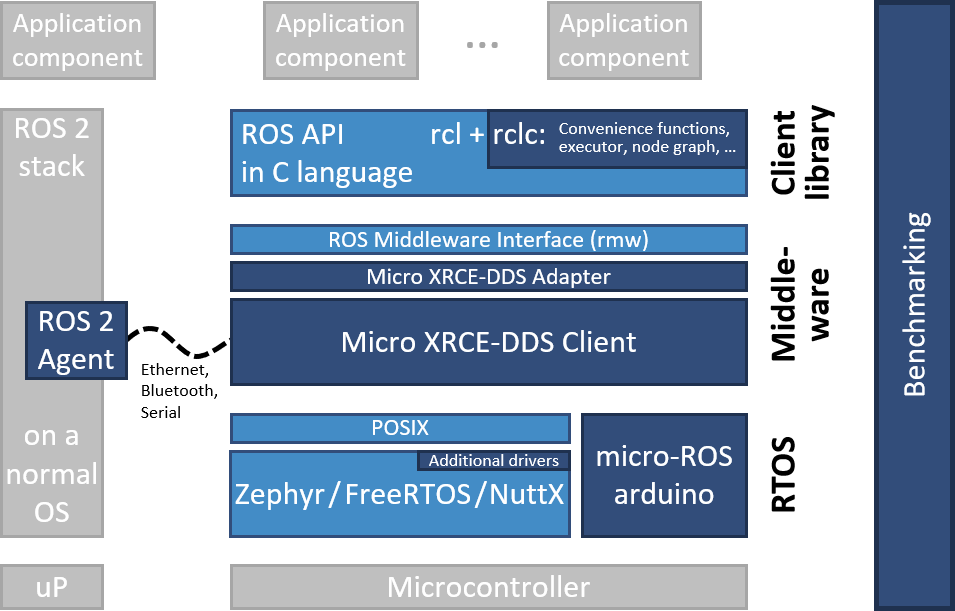
- micro-ROS: Run ROS 2 on microcontroller (ESP32, STM32) — connect embedded layer
ROS 1 vs ROS 2 Comparison
| Criteria | ROS 1 | ROS 2 |
|---|---|---|
| Middleware | Custom (TCPROS) | DDS (industry standard) |
| Master Node | Required (roscore) |
Not needed |
| Real-Time | Not supported | QoS profiles |
| Security | None | SROS2 (TLS/DTLS) |
| Multi-Robot | Difficult (namespace) | Easy (DDS domain) |
| OS | Ubuntu only | Ubuntu, Windows, macOS |
| Lifecycle | None | Lifecycle nodes |
Conclusion
ROS 2 has matured enough for production use. With rich ecosystem (Navigation2, MoveIt2, ros2_control), it's top choice for any robot project from research to commercial.
Next Steps:
- Install ROS 2 Humble and try
turtlesimdemo - Read SLAM and Navigation to understand robot autonomy
- Explore Micro-ROS for microcontroller integration
- Learn Python robot control with ROS 2