Pelican-VLA 0.5 is a new Vision-Language-Action (VLA) model from the WFM System Group at the Beijing Innovation Center of Humanoid Robotics (X-Humanoid). The original technical report is Pelican-VLA 0.5: Attending Before Acting Benefits Generalization. The public repository is Open-X-Humanoid/Pelican-VLA05, the cross-embodiment checkpoint is hosted at X-Humanoid/Pelican-VLA05, and the RoboTwin fine-tuned checkpoint is available at X-Humanoid/Pelican-VLA05-Robotwin.
The important idea is not just another benchmark score. Pelican-VLA 0.5 is interesting because of its Bottleneck Tokens, called BotTokens in the paper. These are learnable tokens inserted between perception and action. They prevent the action pathway from directly reading the full set of dense visual tokens. Instead, the model must compress task-relevant visual information through a small interface before predicting robot actions. For anyone training manipulation policies on LeRobot datasets, this is a useful design lesson: a robot policy does not only need to see the image; it needs to learn where to attend before acting.
This guide is practical. We will cover the paper idea, the architecture, LeRobot 3.0 dataset preparation, installation, checkpoint setup, inference, attention visualization, the training and fine-tuning recipe, and the reported results. If you already followed an OpenVLA with LeRobot hands-on workflow, this article is the next step for evaluating a more recent VLA policy on your own robot data.
What Problem Does Pelican-VLA 0.5 Solve?
VLA models such as OpenVLA, π0, π0.5, GR00T, SpatialVLA, and InternVLA all try to connect three domains: images, language, and continuous robot actions. For an instruction like "pick up the bottle", the policy must read multi-camera observations, understand the language, identify the correct bottle, infer the contact region for the gripper, and output a smooth action chunk that does not collide or miss the grasp.
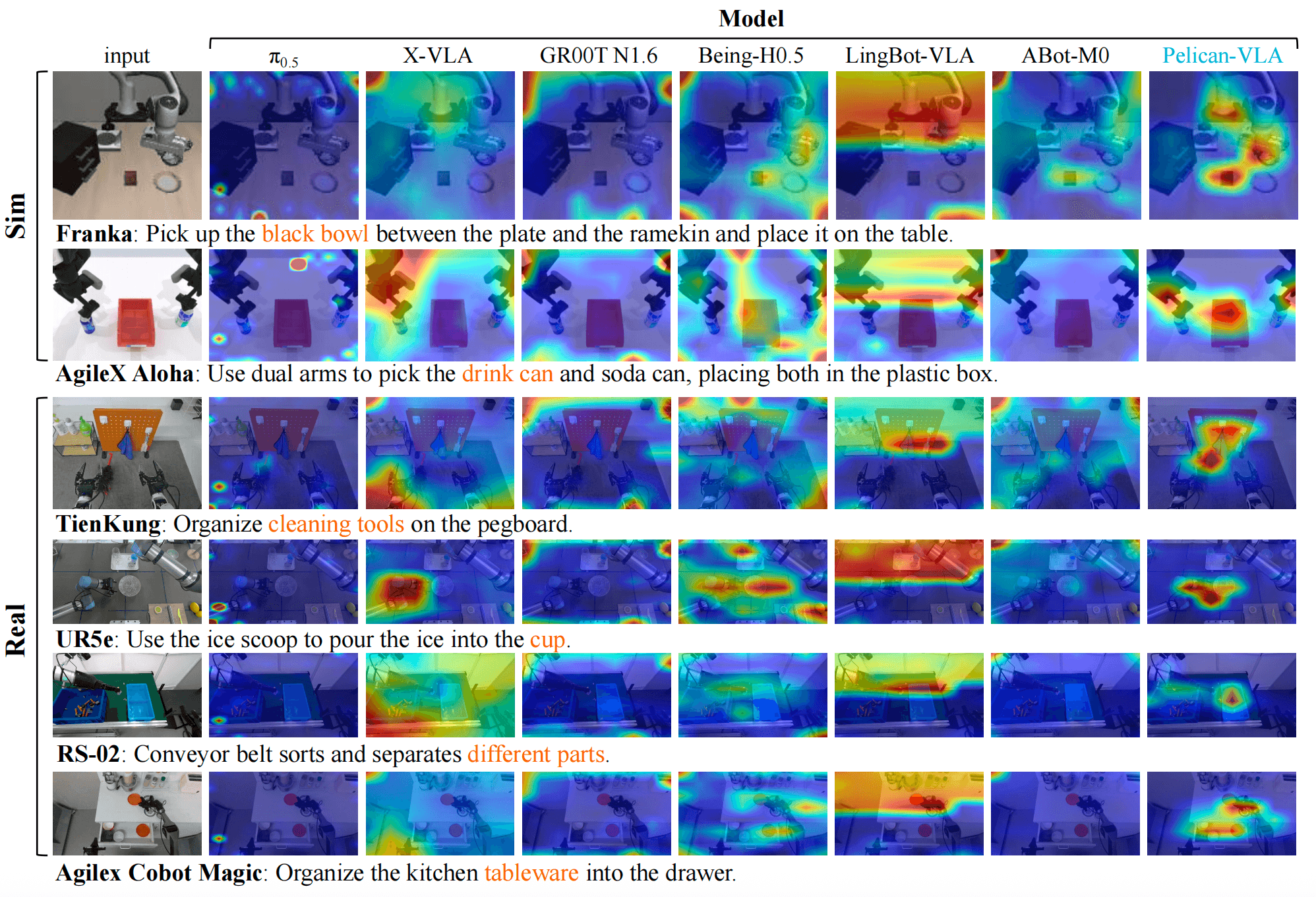
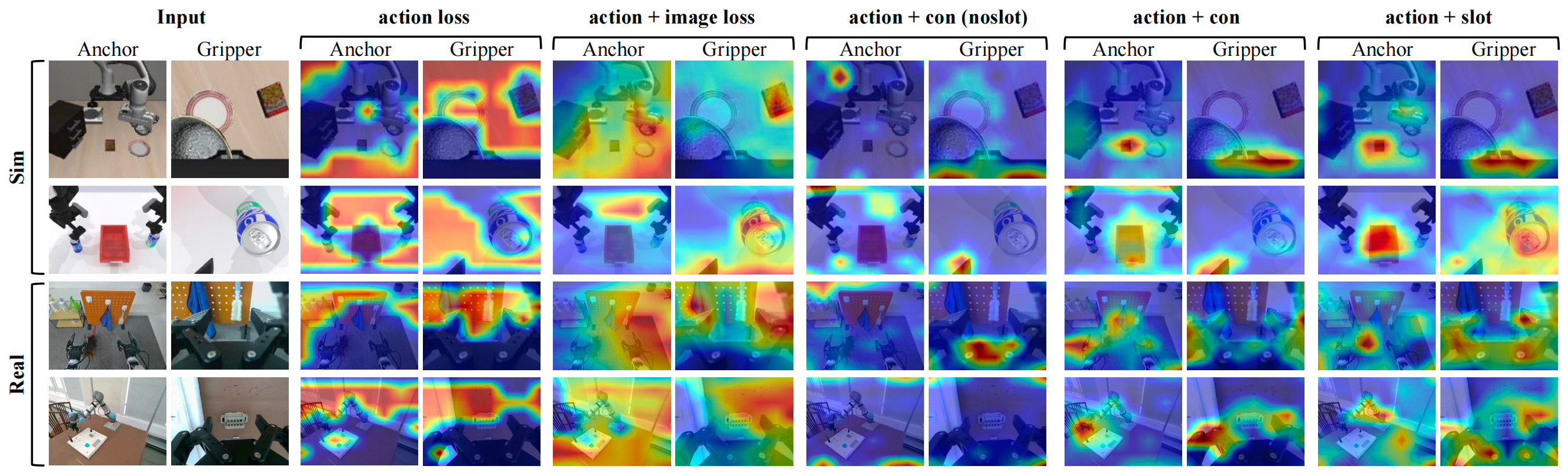
The problem is that many VLA models show diffuse action attention. When researchers visualize action-to-image attention, the model does not always focus on the object being manipulated. Attention may spread across the robot arm, the background, unrelated objects, or texture shortcuts in the scene. This can still produce a low training loss on familiar demonstrations, but it hurts generalization when the target object, scene layout, task, or robot embodiment changes.
Pelican-VLA 0.5 asks a more architectural question: if the action pathway is forced to pass through a compact bottleneck, can the model naturally learn a more manipulation-centric representation? The paper reports that it can. Without object annotations, segmentation masks, attention supervision, or reasoning traces, the pre-trained model already focuses its action-pathway attention on the instruction-relevant object and contact area in zero-shot settings.
Architecture: One Token Stream, Four Segments
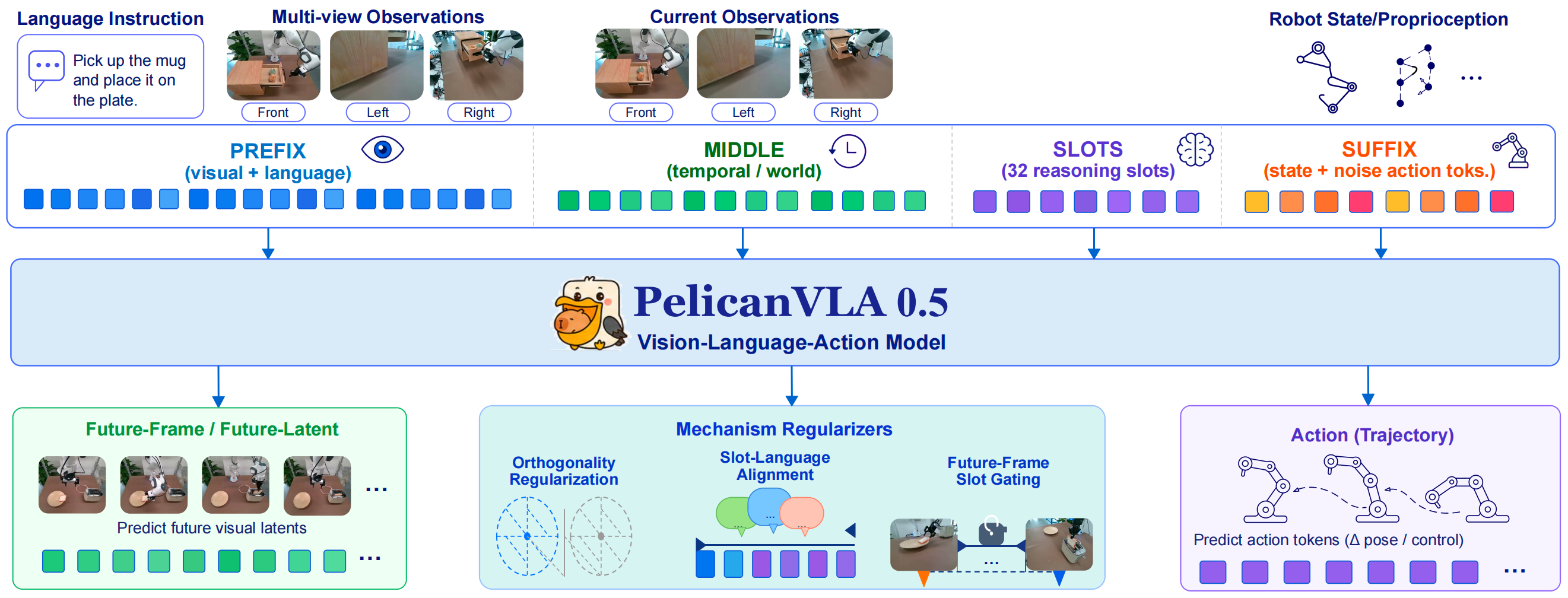
Pelican-VLA 0.5 uses a shared Qwen3-VL 4B backbone for vision-language understanding, future-frame generation, and action prediction. Instead of splitting the system into separate large experts, the model places everything into one token sequence with four consecutive segments:
| Token segment | Role |
|---|---|
| Prefix | Multi-view image tokens and language instruction, providing scene semantics |
| Middle | Cosmos latent tokens from the visual history and future-frame branch, carrying dynamics information |
| Bottleneck | 32 learnable BotTokens that compress manipulation-relevant information |
| Suffix | Proprioceptive state and noisy action tokens for the flow-matching action head |
The key is the attention geometry. The action suffix cannot bypass the BotTokens and directly read dense visual tokens. If action tokens could attend to every image patch, the bottleneck would become decorative. The paper uses three mechanisms to make the bottleneck meaningful:
- Curriculum bottleneck mask: during training, the perception-to-action route is controlled so the model gradually learns to pass through BotTokens.
- Orthogonality regularizer: the BotTokens are discouraged from collapsing into the same vector, so different tokens can carry different information.
- BotToken-gated generation: future-frame generation is tied to BotTokens, so the tokens learn about expected scene change, not only action regression.
The action head uses flow matching. Instead of directly outputting a single action vector, the model predicts denoising velocities for an action chunk. According to the model card, the checkpoint has about 5B parameters, an action chunk size of 50, 10 denoising steps by default, 224 x 224 image resolution, maximum state/action dimension of 32, and bfloat16 as the default dtype.
Why Do Bottleneck Tokens Help the Policy Attend?
Imagine a front camera view containing the robot arm, a table, a bottle, a box, a switch, and background clutter. If the action decoder can read all image tokens directly, it can rely on many shortcuts: a familiar arm position, a familiar table texture, the usual location of an object in the training set, or correlations between the task and the scene. Training loss may still decrease, but the representation may not generalize.
BotTokens create a narrow interface between perception and action. Because this interface has fixed capacity, the model is encouraged to select the information that matters most for manipulation. In practice, that usually means:
| Information type | Example in a pick-and-place task |
|---|---|
| Target object | The bottle to grasp, not a nearby distractor |
| Contact region | Bottle neck, body, handle, or approach point for the gripper |
| Robot-state constraint | Whether the gripper is open, where the wrist can approach from |
| Intended future change | The object will be lifted, moved, and placed on a platform |
The paper includes a useful ablation. Action loss alone does not produce object-centric attention. Adding future-frame generation is not enough. Adding a contrastive language loss to a dense model is also not enough. The manipulation-centric pattern appears when perception is routed through the BotTokens. In other words, the authors do not merely claim that the model is better; they separate data, losses, and architecture to identify the bottleneck route as the important mechanism.
Environment Setup
The public repository currently focuses on inference and attention visualization. At the time of writing, pelican_vla0.5_infer/README.md states that the inference release does not include full training scripts or dataset builders. Therefore it is useful to separate what you can do immediately from what still depends on the full training release:
| Goal | Possible with the current public release? |
|---|---|
| Load the pre-trained checkpoint | Yes |
| Run an inference smoke test with random images | Yes |
| Run inference on robot images and state | Yes, if camera/state/action mapping is correct |
| Visualize attention on LeRobot 3.0 data | Yes, through attention_vis |
| Reproduce the full 2,400-hour pre-training run | Not from the inference package alone |
| Fine-tune exactly as in the paper | Depends on the official training code release |
For inference, use a recent NVIDIA GPU with bfloat16 support, enough RAM, and enough storage for the checkpoint. Because the model is about 5B parameters, an A100, L40S, or RTX 6000 Ada will be more comfortable. An RTX 4090 24GB can be useful for small inference or limited fine-tuning experiments, but you must watch VRAM carefully.
conda create -n pelicanvla python=3.10 -y
conda activate pelicanvla

pip install torch torchvision torchaudio --index-url https://download.pytorch.org/whl/cu121
pip install huggingface_hub safetensors accelerate
Download the checkpoints:
huggingface-cli download X-Humanoid/Pelican-VLA05 --local-dir ./pretrained_model
huggingface-cli download X-Humanoid/Pelican-VLA05-Robotwin --local-dir ./robotwin_model
Install the inference package from the release:
cd Pelican-VLA05/pelican_vla0.5_infer
pip install -r requirements.txt
# or, if you want to import it as a local package:
pip install -e .
You also need Qwen3-VL-4B-Instruct and the Cosmos tokenizer. The README uses QWEN3_VL_PATH for the Qwen3-VL backbone. The Cosmos tokenizer can be downloaded on first use, or you can point the code to a local offline copy:
export QWEN3_VL_PATH=/path/to/Qwen3-VL-4B-Instruct
export COSMOS_TOKENIZER_PATH=/path/to/Cosmos-0.1-Tokenizer-CI8x8
Run the smoke test before touching your dataset:
python pelicanvla05_infer.py --model_path /path/to/pretrained_model --action_dim 7
If this fails, debug CUDA, the transformers version, checkpoint paths, config.json, stats.json, and safetensors filenames before debugging LeRobot data.
Preparing a LeRobot 3.0 Dataset
Pelican-VLA's attention visualizer can run on your own recordings if they are packaged as a LeRobotDataset v3.0 dataset. This is the dataset format version, not necessarily the Python package version. A typical v3 dataset directory looks like this:
my_dataset/
├── meta/
│   ├── info.json
│   └── episodes/chunk-000/*.parquet
├── data/chunk-000/file-000.parquet
└── videos/
    ├── observation.images.front/chunk-000/file-000.mp4
    └── observation.images.wrist/chunk-000/file-000.mp4
In meta/info.json, inspect codebase_version, fps, features, video keys, state columns, and action columns. With Pelican-VLA, many failures come from mapping errors rather than the model itself: camera names do not match camera_map, state vectors have the wrong dimension, the gripper is treated as delta when it should be absolute, or action dimensions are padded incorrectly.
A minimum checklist:
| Component | What to verify |
|---|---|
| Camera | RGB uint8, H x W x C order, names matching camera_map |
| State | Joint position and gripper position with the right dimension and units |
| Action | Absolute target or delta target must match delta_mask |
| Instruction | Each episode has clear task text, not vague labels |
| Stats | stats.json contains correct normalization for the robot type |
Example metadata inspection:
import json
from pathlib import Path

root = Path("/abs/path/to/my_dataset")
info = json.loads((root / "meta/info.json").read_text())
print(info["codebase_version"])
print(info["fps"])
print([k for k, v in info["features"].items() if v.get("dtype") == "video"])
print(info["features"].keys())
If you are moving from an older dataset, review the OpenVLA with LeRobot workflow for recording, normalization, splitting, and evaluation before putting a large VLA model into the loop.
Inference: From Images, State, and Instruction to Action Chunks
The public inference API is direct. Load normalization stats, create a PelicanVLA05Inference engine, pass multi-camera images, the current robot state, and the instruction. The example below follows the structure from the original README with comments added for clarity:
import numpy as np
from pelicanvla05_infer import PelicanVLA05Inference, load_stats_json

state_stats, action_stats = load_stats_json(
    "/path/to/pretrained_model/stats.json",
    state_keys=[
        "observation.state.arm.position",
        "observation.state.effector.position",
    ],
    action_keys=[
        "action.arm.position",
        "action.effector.position",
    ],
    robot_type="ur_5e_singleArm",
)

engine = PelicanVLA05Inference(
    model_path="/path/to/pretrained_model",
    camera_map={
        "front": "image0",
        "wrist": "image1",
        "side": "image2",
    },
    state_stats=state_stats,
    action_stats=action_stats,
    action_dim=7,
    delta_mask=[True, True, True, True, True, True, False],
)

action_chunk = engine.infer(
    images={
        "front": front_rgb,
        "wrist": wrist_rgb,
        "side": side_rgb,
    },
    state=[j1, j2, j3, j4, j5, j6, gripper],
    task="pick up the cup",
)

engine.reset()
action_chunk has shape (chunk_size, action_dim). The model card lists a default chunk size of 50. In a real robot loop, do not blindly execute all 50 actions without re-observation. A safer pattern is receding-horizon control: execute the first few actions, observe again, call the policy again, and repeat. When the scene changes quickly or the gripper is near contact, shorter horizons reduce accumulated error.
Attention Visualization on LeRobot 3.0
The most useful part of the release is attention_vis. It dumps action-to-image attention into .npz files per camera and renders overlay PNGs or montage figures, so you can inspect where the policy attends.
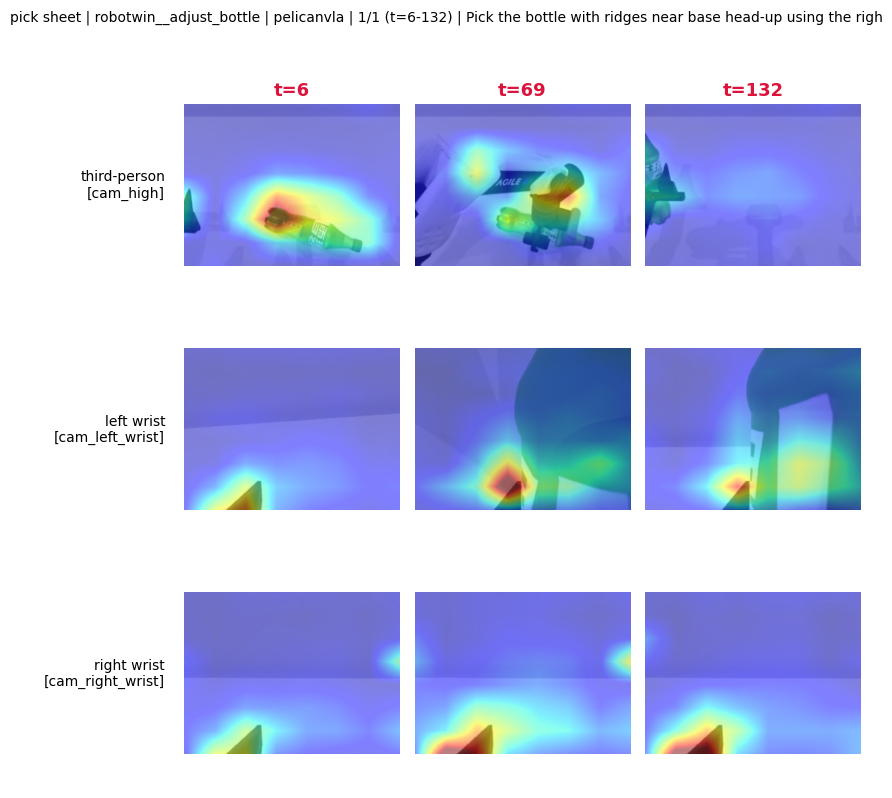
Install the visualizer:
cd Pelican-VLA05/attention_vis
python -m venv .venv
. .venv/bin/activate
pip install -e '.[data]'
Create .env:
ATTNVIS_PELICANVLA_SRC=/path/to/Pelican-VLA05/pelican_vla0.5_infer
ATTNVIS_PELICANVLA_CKPT=/path/to/pretrained_model
QWEN3_VL_PATH=/path/to/Qwen3-VL-4B-Instruct
COSMOS_TOKENIZER_PATH=/path/to/Cosmos-0.1-Tokenizer-CI8x8
ATTNVIS_ROBOTWIN_ROOT=/path/to/RoboTwin2_0_processed/robotwin
Run preflight and dump:
set -a && source .env && set +a
export PYTHONPATH=$PWD/src

python -m attnvis preflight robotwin:adjust_bottle:0
python -m attnvis run --scenes robotwin:adjust_bottle:0 --nframes 3 --exp case_study
python -m attnvis fig montage --root outputs/dense/case_study
For your own dataset, register an embodiment as described in attention_vis/README.md: camera keys, state columns, instruction source, and dataset path. The goal is not just to produce a good-looking figure. The technical question is whether the model attends to the requested object and contact region, or whether attention still spreads over the arm and background.
Training and Fine-Tuning: Read the Release Status Correctly
The paper states that Pelican-VLA 0.5 was pre-trained on about 2,400 hours of heterogeneous manipulation data. RoboTwin was not used during pre-training. The model was then fine-tuned on RoboTwin 2.0 for the clean and randomized benchmark. The repository README mentions a training-code release plan, while the inference README currently emphasizes that full training scripts and dataset builders are not included in the inference-focused package.
So if you want to train exactly as the paper describes, start by understanding the recipe:
| Objective | Purpose |
|---|---|
| Flow-matching action loss | Learn to denoise action chunks from noisy action tokens |
| Future-frame generation loss | Encourage middle/Cosmos latents to retain dynamics information |
| BotTokens-language contrastive alignment | Make the BotTokens representation more controllable by instruction |
| Orthogonality regularizer | Reduce collapse among the BotTokens |
| Total objective | Combine action, generation, task alignment, and regularization |
A practical fine-tuning workflow on your own dataset should move from small to large:
- Run the pre-trained checkpoint on several episodes to validate camera, state, and action mapping.
- Run
attention_visto check whether the model attends to the correct object. - Fine-tune only the action head or a small LoRA adapter before attempting a full 5B-parameter fine-tune.
- Freeze the backbone in the first smoke run to catch stats and action-convention bugs.
- Open more BotToken/action layers only if validation rollouts still fail despite correct attention.
The pseudo command below shows the parameters you should look for when the official training entrypoint is available. It is not presented as a script that already exists in the current public repository:
python train_pelicanvla05.py \
  --pretrained_model ./pretrained_model \
  --dataset_root /data/my_lerobot_v3 \
  --dataset_format lerobot_v3 \
  --state_keys observation.state.arm.position observation.state.effector.position \
  --action_keys action.arm.position action.effector.position \
  --camera_keys observation.images.front observation.images.wrist observation.images.side \
  --action_dim 7 \
  --chunk_size 50 \
  --precision bf16 \
  --loss_action flow_matching \
  --enable_bottleneck_tokens true \
  --enable_future_generation true \
  --output_dir runs/pelican_my_robot
If the official training release uses a different script name, the important part remains the same: mapping and conventions. A large VLA can appear to train successfully while still failing on the robot if cameras are swapped, gripper normalization is wrong, or training instructions do not match inference-time prompts.
Results: Strong Attention, Remaining Action Gap
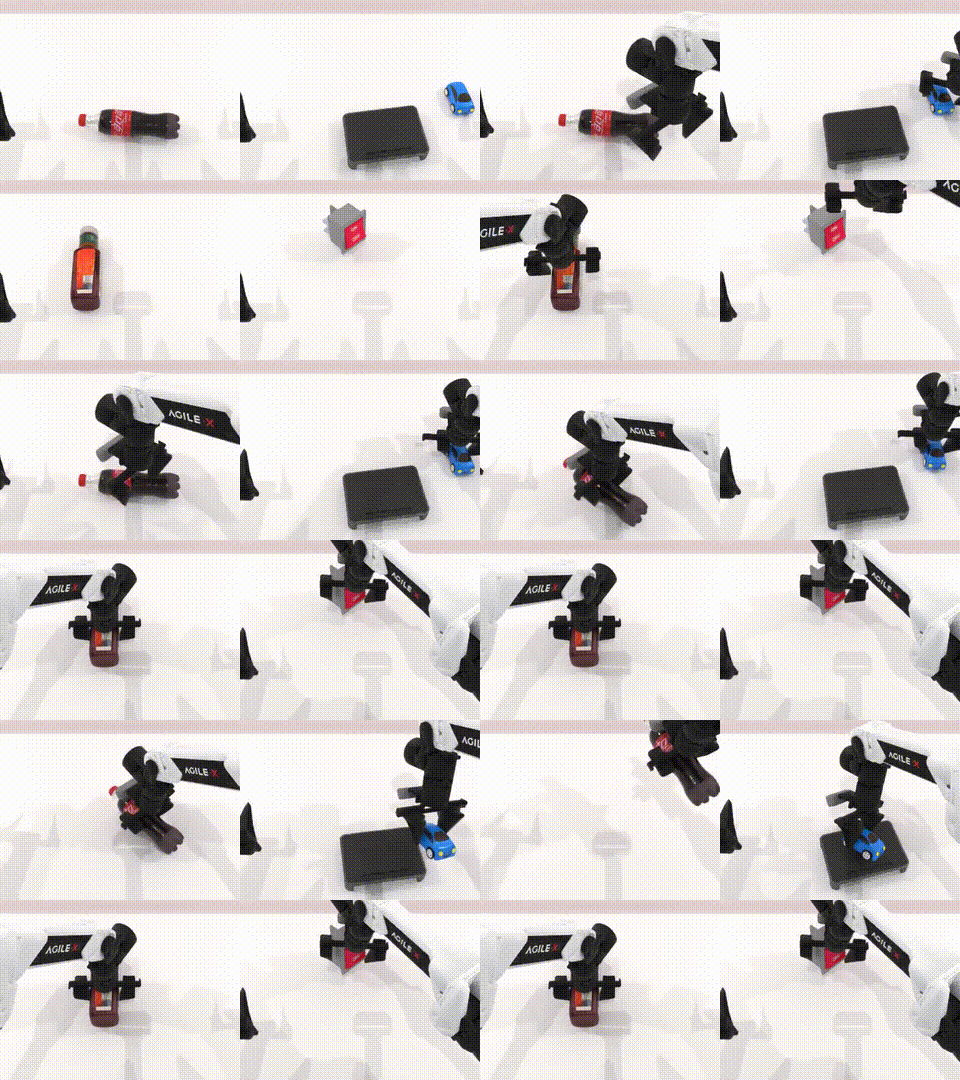
On RoboTwin 2.0, the fine-tuned checkpoint reports 91.4% success on Clean and 91.0% on Randomized, for an average of 91.2%. In the repository table, this is higher than open-source baselines including π0, π0.5, X-VLA, StarVLA-OFT, ABot-M0, LingBot-VLA, Qwen-VLA, JoyAI-RA, and Hy-VLA.
The caveat is important. Pelican-VLA 0.5 is not presented as a solved zero-shot manipulation model. The paper describes it as an intermediate model. It has learned attention-level generalization, meaning it often knows where to look, but it still has a representation-to-action gap: attending to the correct object does not automatically produce stable grasps, accurate contact timing, or precise placement on a new embodiment.
The paper's checkpoint analysis supports this interpretation. Target-object IoU rises from 0.054 at 50k steps to 0.124 at 500k steps, with Spearman rho 0.76 and p = 0.01. Attention to the manipulator remains high and stable around 0.35. That makes sense: the robot still needs to know the arm and gripper state, but the valuable learning signal is the gradual migration toward the instruction-relevant object.
After fine-tuning, the attention maps remain very similar to the zero-shot model. The paper reports attention similarity around 0.928 after fine-tuning. A practical interpretation is that fine-tuning mainly turns an already-grounded representation into better executable actions; it does not create grounding from scratch.
When Should You Try Pelican-VLA 0.5?
Pelican-VLA 0.5 is worth testing if your team has one of these goals:
| Goal | Why it fits |
|---|---|
| Evaluate VLA attention | The attention_vis release is clear and practical |
| Use LeRobot 3.0 datasets | The visualizer can read v3 data once you register the embodiment |
| Manipulate among distractors | Bottleneck Tokens are designed to reduce diffuse attention |
| Compare against OpenVLA or π0.5 | The RoboTwin table includes same-generation baselines |
| Start research fine-tuning | The 5B checkpoint is useful, but requires serious GPU resources |
You should not treat it as a production controller for high-risk tasks, force-sensitive contact, or industrial safety requirements. The model card also describes it as a research model. On a real robot, start with offline replay, then use low speed, a limited workspace, a physical emergency stop, and controller-level guardrails.
Debug Checklist for Beginners
When the system fails, debug in this order:
| Symptom | Common cause | What to check |
|---|---|---|
| Checkpoint load fails | Wrong safetensors layout or missing config.json |
Compare with the README checkpoint layout |
| CUDA out of memory | 5B parameters are heavy even in bf16 | Reduce batch size, use a larger GPU, disable visualization when not needed |
| Action contains NaN | Wrong stats or state/action keys | Print normalized state and action min/max |
| Robot moves in the wrong direction | Delta/absolute action mismatch | Check delta_mask and gripper convention |
| Attention looks good but task fails | Representation-to-action gap | Add action data, check controller and horizon |
| Attention spreads to the background | Weak instruction text or wrong camera map | Inspect overlays per camera and task prompt |
For comparison, place Pelican-VLA 0.5 next to OpenVLA and InternVLA-A1.5. The useful distinction is that Pelican-VLA 0.5 focuses on routing perception to action through a bottleneck, while InternVLA-A1.5 focuses on latent foresight supervised by a video model.
Conclusion
Pelican-VLA 0.5 is a useful architecture lesson for manipulation VLA: before a robot can act reliably, the policy must learn where to attend. Bottleneck Tokens are not cosmetic. The paper's ablations point to them as the main mechanism behind manipulation-centric attention. With LeRobot 3.0, the most immediately useful public pieces are inference and attention visualization. Full training still depends on the official training release, but the paper already gives enough structure to prepare your dataset, camera/state/action mapping, and fine-tuning plan.