What is Nav2?
Nav2 (Navigation2) is the official navigation stack for ROS 2 -- a complete toolkit for robots to automatically move from point A to point B in known or unknown environments. Nav2 replaces the old ROS 1 navigation stack with entirely new architecture, more flexible and powerful.
If you're building an AMR (Autonomous Mobile Robot) for factories, warehouses, or any application, Nav2 is the best starting point. It provides everything you need: SLAM, localization, path planning, obstacle avoidance, and recovery behaviors.
In this post, I'll guide you through setting up Nav2 from scratch -- from building a map to autonomous navigation.

Nav2 Stack Architecture
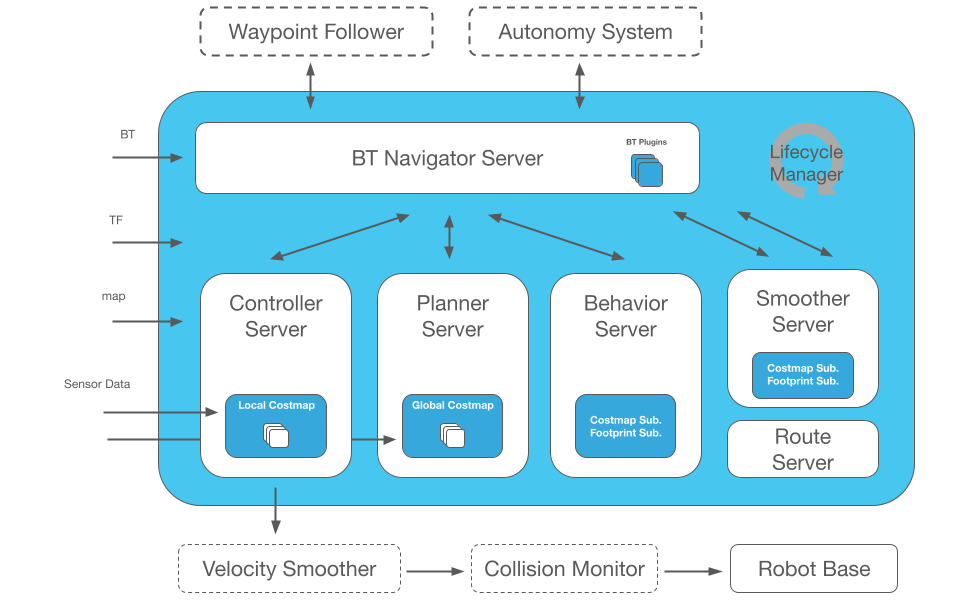
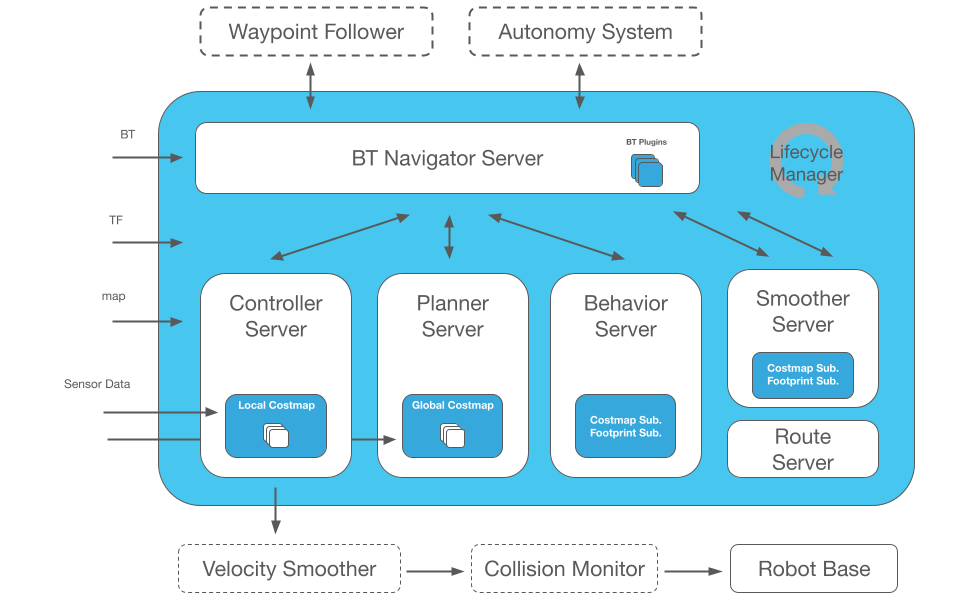
Nav2 is designed with modular architecture -- each component is a separate ROS 2 node, communicating via topics, services, and actions. You can replace any component without affecting the rest.
Main Components
                    ┌─────────────────────┐
                    │   BT Navigator      │  ← Behavior Tree orchestration
                    └────────┬────────────┘
                             │
              ┌──────────────┼──────────────┐
              │              │              │
    ┌─────────▼──────┐ ┌────▼─────┐ ┌─────▼────────┐
    │   Planner      │ │ Controller│ │  Recovery    │
    │   Server       │ │  Server  │ │  Server      │
    └─────────┬──────┘ └────┬─────┘ └─────┬────────┘
              │              │              │
    ┌─────────▼──────┐ ┌────▼─────┐ ┌─────▼────────┐
    │  NavFn/Smac/   │ │ DWB/MPPI/│ │ Spin/Backup/ │
    │  Theta*        │ │ RPP      │ │ Wait         │
    └────────────────┘ └──────────┘ └──────────────┘
              │              │
    ┌─────────▼──────────────▼─────┐
    │     Costmap 2D               │  ← Global + Local costmaps
    │  (static + obstacle layers)  │
    └──────────────────────────────┘
- BT Navigator: orchestrates entire navigation process using Behavior Tree
- Planner Server: computes global path from current location to goal
- Controller Server: follows global path and avoids local obstacles
- Recovery Server: handles robot being stuck (spin, back up, wait)
- Costmap 2D: cost map for path planning and obstacle avoidance
Step 1: Build Map with slam_toolbox
Before navigating, robot needs a map. slam_toolbox is the main SLAM package for Nav2.
Installation
# ROS 2 Humble
sudo apt install ros-humble-slam-toolbox
sudo apt install ros-humble-navigation2 ros-humble-nav2-bringup
Run SLAM
# Terminal 1: Launch robot (or simulation)
ros2 launch my_robot robot.launch.py

# Terminal 2: Launch slam_toolbox
ros2 launch slam_toolbox online_async_launch.py \
  use_sim_time:=true

# Terminal 3: Launch RViz2 to visualize map
ros2 launch nav2_bringup rviz_launch.py
Drive robot around the environment (with teleop or joystick). slam_toolbox automatically builds an occupancy grid map.
Save Map
# Save map when done scanning
ros2 run nav2_map_server map_saver_cli -f my_warehouse
# Creates 2 files: my_warehouse.pgm (image) and my_warehouse.yaml (metadata)
my_warehouse.yaml:
image: my_warehouse.pgm
resolution: 0.05          # 5cm per pixel
origin: [-10.0, -10.0, 0] # Map origin (x, y, yaw)
occupied_thresh: 0.65
free_thresh: 0.25
negate: 0
Step 2: Localization with AMCL
With map in hand, robot needs to know where it is. AMCL (Adaptive Monte Carlo Localization) uses particle filter to estimate robot pose on map.
# amcl config
amcl:
  ros__parameters:
    use_sim_time: true
    alpha1: 0.2   # Rotation noise from rotation
    alpha2: 0.2   # Rotation noise from translation
    alpha3: 0.2   # Translation noise from translation
    alpha4: 0.2   # Translation noise from rotation
    base_frame_id: "base_footprint"
    global_frame_id: "map"
    max_particles: 2000
    min_particles: 500
    robot_model_type: "nav2_amcl::DifferentialMotionModel"
    tf_broadcast: true
    set_initial_pose: true
    initial_pose:
      x: 0.0
      y: 0.0
      yaw: 0.0
Step 3: Path Planning -- NavFn vs Smac vs Theta*
Nav2 offers multiple planner plugins. Each has its own characteristics.
NavFn (Navigation Function)
- Algorithm: Dijkstra or A*
- Output: grid-based path
- Advantages: fast, simple, reliable
- Disadvantages: path not smooth, only 8-connected directions
planner_server:
  ros__parameters:
    planner_plugins: ["GridBased"]
    GridBased:
      plugin: "nav2_navfn_planner::NavfnPlanner"
      tolerance: 0.5
      use_astar: true
      allow_unknown: true
Smac Planner (State Lattice)
- Algorithm: A* on state lattice (x, y, theta)
- Variants: Smac 2D, Smac Hybrid-A*, Smac Lattice
- Advantages: kinematically feasible paths, smooth, supports non-holonomic robots
- Best for: Ackermann steering, differential drive needing smooth paths
planner_server:
  ros__parameters:
    planner_plugins: ["SmacPlanner"]
    SmacPlanner:
      plugin: "nav2_smac_planner::SmacPlannerHybrid"
      tolerance: 0.25
      motion_model_for_search: "DUBIN"  # DUBIN, REEDS_SHEPP, STATE_LATTICE
      angle_quantization_bins: 72
      minimum_turning_radius: 0.40
Theta* (Any-Angle)
- Algorithm: Theta* -- A* with line-of-sight optimization
- Advantages: shorter paths than NavFn, any-angle (not limited to 8 directions)
- Disadvantages: doesn't consider kinematics
Planner Comparison Table
| Planner | Path Quality | Speed | Kinematic Feasible | Use Case |
|---|---|---|---|---|
| NavFn (A*) | Average | Fastest | No | Quick prototype |
| Smac 2D | Good | Fast | No | Omnidirectional |
| Smac Hybrid-A* | Very good | Medium | Yes | Diff-drive, Ackermann |
| Smac Lattice | Best | Slowest | Yes (full) | Non-holonomic |
| Theta* | Good | Fast | No | Any-angle paths |

Step 4: Controller -- Follow Path and Avoid Obstacles
Controller (previously called local planner) is responsible for following global path and avoiding dynamic obstacles.
DWB (Dynamic Window Based)
Inherited from DWA (Dynamic Window Approach) in ROS 1. Samples velocity commands and selects best command based on multiple critics.
MPPI (Model Predictive Path Integral)
Newest, most powerful controller in Nav2. Uses sampling-based MPC -- generates thousands of trajectory candidates on GPU/CPU and selects optimal trajectory.
controller_server:
  ros__parameters:
    controller_plugins: ["FollowPath"]
    FollowPath:
      plugin: "nav2_mppi_controller::MPPIController"
      time_steps: 56
      model_dt: 0.05
      batch_size: 2000
      vx_max: 0.5
      vy_max: 0.0
      wz_max: 1.9
      critics:
        - "GoalCritic"
        - "GoalAngleCritic"
        - "ObstaclesCritic"
        - "PathFollowCritic"
        - "PathAngleCritic"
        - "PreferForwardCritic"
RPP (Regulated Pure Pursuit)
Simple and effective -- follows path using pure pursuit with regulated speed. Good for fast-moving robots in wide corridors.
Step 5: Behavior Trees -- Nav2's Brain
Nav2 uses Behavior Trees (BT) instead of state machines for orchestration. BT is more flexible, easier to debug, and customizable.
Default BT: NavigateToPose
<root BTCPP_format="4">
  <BehaviorTree ID="NavigateWithReplanning">
    <PipelineSequence>
      <!-- Compute path -->
      <RateController hz="1.0">
        <ComputePathToPose goal="{goal}" path="{path}"
                           planner_id="GridBased"/>
      </RateController>

      <!-- Follow path -->
      <ReactiveSequence>
        <PathExpiringTimer seconds="5.0" path="{path}"/>
        <FollowPath path="{path}" controller_id="FollowPath"/>
      </ReactiveSequence>
    </PipelineSequence>
  </BehaviorTree>
</root>
Custom BT: Add Recovery Behaviors
<root BTCPP_format="4">
  <BehaviorTree ID="NavigateWithRecovery">
    <RecoveryNode number_of_retries="3">
      <PipelineSequence>
        <ComputePathToPose goal="{goal}" path="{path}"/>
        <FollowPath path="{path}"/>
      </PipelineSequence>

      <!-- Recovery actions on failure -->
      <SequenceStar>
        <ClearEntireCostmap name="ClearGlobalCostmap"
                            service_name="/global_costmap/clear_entirely_global_costmap"/>
        <ClearEntireCostmap name="ClearLocalCostmap"
                            service_name="/local_costmap/clear_entirely_local_costmap"/>
        <Spin spin_dist="1.57"/>  <!-- Spin 90 degrees -->
        <Wait wait_duration="3"/>
        <BackUp backup_dist="0.3" backup_speed="0.1"/>
      </SequenceStar>
    </RecoveryNode>
  </BehaviorTree>
</root>
Step 6: Complete Launch Config
# nav2_launch.py
from launch import LaunchDescription
from launch.actions import IncludeLaunchDescription
from launch.launch_description_sources import PythonLaunchDescriptionSource
from ament_index_python.packages import get_package_share_directory
import os

def generate_launch_description():
    nav2_dir = get_package_share_directory('nav2_bringup')

    return LaunchDescription([
        IncludeLaunchDescription(
            PythonLaunchDescriptionSource(
                os.path.join(nav2_dir, 'launch', 'bringup_launch.py')
            ),
            launch_arguments={
                'map': '/path/to/my_warehouse.yaml',
                'params_file': '/path/to/nav2_params.yaml',
                'use_sim_time': 'true',
                'autostart': 'true',
            }.items(),
        ),
    ])
Send Navigation Goal from Code
# Python client to send goal
from geometry_msgs.msg import PoseStamped
from nav2_simple_commander.robot_navigator import BasicNavigator

navigator = BasicNavigator()
navigator.waitUntilNav2Active()

# Create goal pose
goal = PoseStamped()
goal.header.frame_id = 'map'
goal.header.stamp = navigator.get_clock().now().to_msg()
goal.pose.position.x = 5.0
goal.pose.position.y = 3.0
goal.pose.orientation.w = 1.0

# Navigate!
navigator.goToPose(goal)

while not navigator.isTaskComplete():
    feedback = navigator.getFeedback()
    print(f"Distance remaining: {feedback.distance_remaining:.2f}m")

result = navigator.getResult()
print(f"Navigation result: {result}")
Tips and Best Practices
1. Costmap Tuning
Costmap is the most critical factor affecting navigation quality. Some tips:
- inflation_radius: set to minimum safe distance from robot to wall (usually 0.3-0.5m)
- cost_scaling_factor: increase to keep robot away from walls, decrease to drive closer
- observation_sources: specify which sensors feed costmap (LiDAR, depth camera)
2. Recovery Behavior
Always configure recovery behaviors. Robot will get stuck -- question is when, not if.
3. Simulate First, Real Robot Later
Test every config in Gazebo before deploying to real robot. See Simulation for Robotics to choose appropriate simulator.
4. Monitor and Logging
# Check Nav2 status
ros2 topic echo /bt_navigator/transition_event

# View costmap
ros2 topic echo /global_costmap/costmap

# Record rosbag for debugging
ros2 bag record -a -o nav2_debug

Up Next in Series
This is Part 2 of Modern Navigation series. In upcoming posts:
- Part 1: SLAM A to Z: LiDAR, Visual and How Robots Localize -- SLAM Foundation
- Part 3: Learning-based Navigation: GNM, ViNT and NoMaD -- Foundation Models
- Part 4: Vision-Language Navigation: Robot Following Instructions -- VLN and LLM-based Planning
- Part 5: Outdoor Navigation and Multi-Robot Coordination -- GPS-denied Nav, MAPF
Related Posts
- ROS 2 Nav2 Deep-Dive -- More detailed post on Nav2 in ROS 2 series
- SLAM A to Z -- Build map before navigating
- AGV vs AMR: Comparison and Selection -- Choose appropriate robot type
- Open-RMF Fleet Management -- Managing multiple Nav2 robots together