What is SLAM?
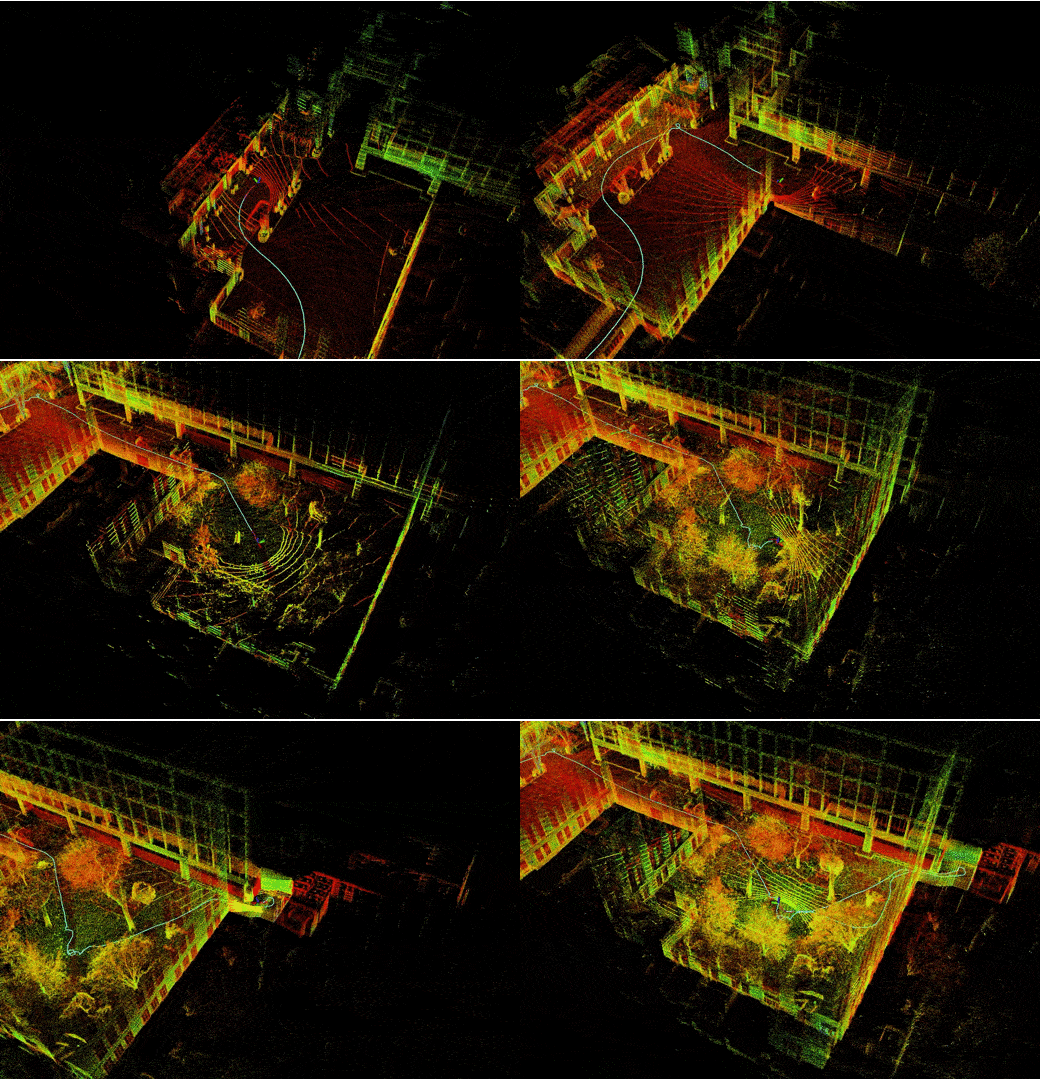
SLAM (Simultaneous Localization and Mapping) is a classic robotics problem: a robot must simultaneously build a map of its surrounding environment and determine its own position on that map. This is the foundation for autonomous robots to operate in previously unknown spaces.
This problem is difficult because two factors depend on each other — accurate localization requires a good map, but building a good map requires accurate localization.
Common SLAM Methods
LiDAR SLAM
Uses laser sensors to scan the environment in 2D or 3D. Common algorithms:
- GMapping: 2D SLAM based on particle filters, suitable for indoor mobile robots. See more about LiDAR and 3D Mapping for advanced applications
- Cartographer (Google): supports both 2D and 3D, handles loop closure well
- RTAB-Map: combines LiDAR and RGB-D camera for detailed 3D mapping
Visual SLAM
Requires only a camera, much cheaper than LiDAR:
- ORB-SLAM3: supports monocular, stereo, and RGB-D cameras
- VINS-Fusion: visual-inertial SLAM, combines camera with IMU
- OpenVSLAM: open-source, easy to integrate with ROS 2

ROS 2 Nav2 Stack
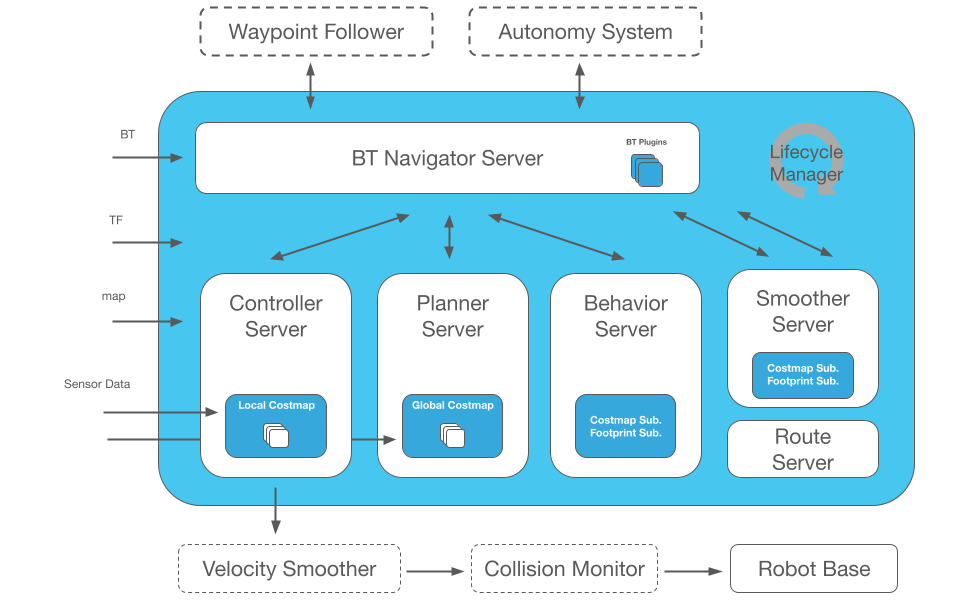
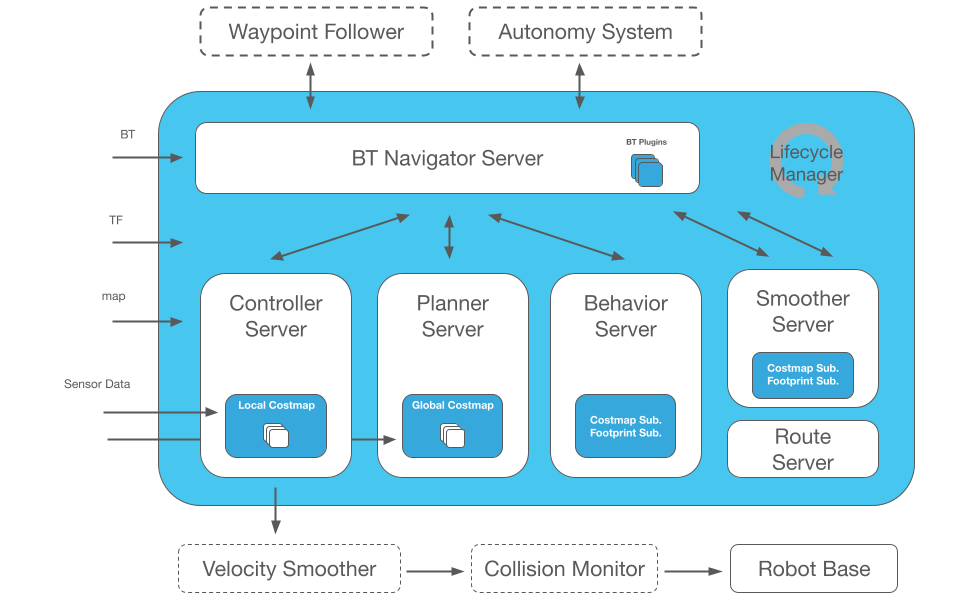
Nav2 is a complete navigation system for ROS 2, encompassing the entire pipeline from SLAM to motion control.
Nav2 Architecture
Sensor Data → SLAM → Map
                       ↓
Goal Position → Planner → Controller → Motor Commands
                       ↑
                  Costmap (obstacle layer + inflation layer)
Basic Nav2 Configuration
The nav2_params.yaml file is the central configuration hub:
bt_navigator:
  ros__parameters:
    global_frame: map
    robot_base_frame: base_link
    default_bt_xml_filename: navigate_w_replanning_and_recovery.xml

controller_server:
  ros__parameters:
    controller_frequency: 20.0
    FollowPath:
      plugin: "dwb_core::DWBLocalPlanner"
      max_vel_x: 0.5
      min_vel_x: -0.1
      max_vel_theta: 1.0
Launch Nav2 with SLAM
# Start SLAM (create new map)
ros2 launch nav2_bringup slam_launch.py

# Or use saved map (localization mode)
ros2 launch nav2_bringup localization_launch.py map:=/path/to/map.yaml

# Start navigation
ros2 launch nav2_bringup navigation_launch.py
Costmap and Obstacle Avoidance
Nav2 uses costmap — a layered cost map for path decisions:
- Static Layer: static map from SLAM
- Obstacle Layer: real-time obstacle detection from sensors
- Inflation Layer: safety buffer around obstacles
- Voxel Layer: 3D obstacles (if using depth camera)
Each cell on the costmap has a value from 0 (free) to 254 (obstacle). The planner finds the path with the lowest total cost.

Real-World Applications in Vietnam
Delivery robots in factories: Using RPLiDAR A2 (around 5 million VND) combined with Nav2 allows AMR robots to move between production stations, a core component of robot fleet management. Factory maps are usually stable, so SLAM only needs to run once, then switch to localization mode.
Restaurant service robots: Visual SLAM with Intel RealSense D435 camera significantly reduces hardware costs compared to LiDAR, suitable for environments with many moving people.
Practical Deployment Tips
- Choose appropriate sensor: LiDAR for industrial environments (high accuracy), camera for consumer applications (low cost)
- Calibrate carefully: The transform between sensor and base_link must be accurate; 1-2 cm error can cause serious drift
- Test recovery behaviors: Robots will get stuck — configure spin, backup, and wait recovery in the behavior tree
- Monitor with RViz2: Always visualize costmap and path planning when debugging
SLAM and navigation are two fundamental skills for any autonomous robot. With ROS 2 Nav2, you can deploy a complete navigation system without starting from scratch.