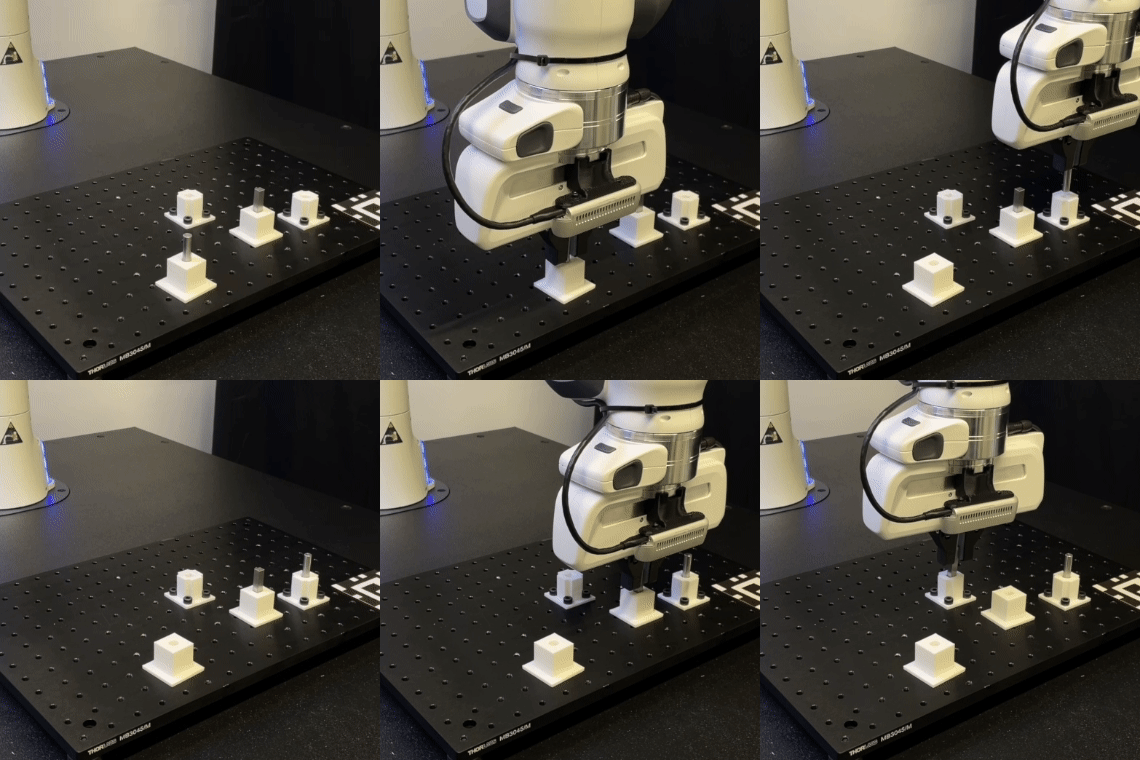
Assembly — fitting parts together — is the ultimate goal of robot manipulation in industry. Inserting chips into sockets, meshing gears onto shafts, snap-fitting plastic enclosures... all of these are contact-rich tasks where the robot must continuously interact with surfaces, manage friction forces, and achieve sub-millimeter precision.
After mastering carrying and pick-and-place, we now enter the most challenging domain of manipulation: contact-rich tasks.
Why Are Contact-Rich Tasks Hard?
| Challenge | Description | Consequence |
|---|---|---|
| Contact dynamics | Friction, deformation, stick-slip | Very large sim-to-real gap |
| Tight clearance | 0.1-0.5mm gap | Position error = jamming |
| Multi-contact | Many simultaneous contact points | Complex state space |
| Force sensitivity | Too much force = damage, too little = failure | Narrow operating range |
| Partial observability | Cannot see inside socket | Need tactile sensing |

Peg-in-Hole: The Classic Benchmark
Peg-in-hole (inserting a peg into a hole) is the standard benchmark for contact-rich manipulation. It seems simple but is extremely difficult — especially when clearance is below 1mm.
Phases of Peg-in-Hole
- Free-space approach: Move peg near the hole
- Search/Alignment: Find exact hole position (wobble search)
- Initial contact: Touch surface, sense forces
- Insertion: Push peg into hole, handle wedging/jamming
- Full seat: Peg fully inserted
import numpy as np

class PegInHoleReward:
    """Multi-phase reward for peg-in-hole task."""

    def __init__(self, hole_pos, hole_depth=0.05, clearance=0.0005):
        self.hole_pos = hole_pos
        self.hole_depth = hole_depth
        self.clearance = clearance

    def compute(self, peg_tip_pos, peg_orientation,
                contact_force, insertion_depth,
                is_jammed, action):
        """
        Args:
            peg_tip_pos: Peg tip position [3]
            peg_orientation: Peg quaternion [4]
            contact_force: Contact force [3]
            insertion_depth: Current insertion depth (m)
            is_jammed: Bool, peg is jammed
            action: Action vector
        """
        rewards = {}

        # Phase 1: APPROACH
        lateral_dist = np.linalg.norm(peg_tip_pos[:2] - self.hole_pos[:2])
        rewards['lateral_align'] = 2.0 * (1.0 - np.tanh(20.0 * lateral_dist))

        # Phase 2: ALIGNMENT — peg must be vertical
        peg_up = self._quat_to_up(peg_orientation)
        alignment = abs(peg_up[2])
        rewards['orientation'] = 1.0 * (alignment - 0.9) / 0.1 if alignment > 0.9 else 0.0

        # Phase 3: INSERTION — push in
        if lateral_dist < self.clearance * 3:
            normalized_depth = insertion_depth / self.hole_depth
            rewards['insertion'] = 10.0 * normalized_depth
        else:
            rewards['insertion'] = 0.0

        # Phase 4: COMPLETION
        if insertion_depth >= self.hole_depth * 0.95:
            rewards['complete'] = 100.0
        else:
            rewards['complete'] = 0.0

        # PENALTIES
        force_mag = np.linalg.norm(contact_force)
        if is_jammed:
            rewards['jam'] = -5.0
        elif force_mag > 20.0:
            rewards['force'] = -0.5 * (force_mag - 20.0) / 10.0
        else:
            rewards['force'] = 0.0
            rewards['jam'] = 0.0

        rewards['smooth'] = -0.01 * np.sum(action ** 2)

        total = sum(rewards.values())
        return total, rewards

    def _quat_to_up(self, quat):
        w, x, y, z = quat
        return np.array([
            2*(x*z + w*y),
            2*(y*z - w*x),
            1 - 2*(x*x + y*y)
        ])
MuJoCo Environment for Peg-in-Hole
import mujoco

PEG_IN_HOLE_XML = """
<mujoco model="peg_in_hole">
  <option timestep="0.001" gravity="0 0 -9.81">
    <flag contact="enable" warmstart="enable"/>
  </option>

  <default>
    <geom condim="4" solref="0.001 1" solimp="0.99 0.99 0.001"/>
  </default>

  <worldbody>
    <light pos="0 0 2"/>
    <geom type="plane" size="1 1 0.1" rgba="0.9 0.9 0.9 1"/>

    <!-- Workpiece with hole -->
    <body name="workpiece" pos="0.5 0 0.4">
      <geom type="box" size="0.1 0.1 0.03" rgba="0.4 0.4 0.4 1" mass="50"/>
      <geom name="hole_wall1" type="box" size="0.006 0.003 0.025"
            pos="0 0.009 0.055" rgba="0.3 0.3 0.3 1"
            contype="1" conaffinity="1" friction="0.5 0.1 0.001"/>
      <geom name="hole_wall2" type="box" size="0.006 0.003 0.025"
            pos="0 -0.009 0.055" rgba="0.3 0.3 0.3 1"
            contype="1" conaffinity="1" friction="0.5 0.1 0.001"/>
      <geom name="hole_wall3" type="box" size="0.003 0.006 0.025"
            pos="0.009 0 0.055" rgba="0.3 0.3 0.3 1"
            contype="1" conaffinity="1" friction="0.5 0.1 0.001"/>
      <geom name="hole_wall4" type="box" size="0.003 0.006 0.025"
            pos="-0.009 0 0.055" rgba="0.3 0.3 0.3 1"
            contype="1" conaffinity="1" friction="0.5 0.1 0.001"/>
      <site name="hole_bottom" pos="0 0 0.03" size="0.005"/>
    </body>

    <!-- Robot arm (simplified) -->
    <body name="arm_base" pos="0 0 0.42">
      <joint name="j0" type="hinge" axis="0 0 1" range="-3.14 3.14" damping="2"/>
      <geom type="cylinder" size="0.04 0.03" rgba="0.7 0.7 0.7 1"/>

      <body name="l1" pos="0 0 0.06">
        <joint name="j1" type="hinge" axis="0 1 0" range="-1.5 1.5" damping="1.5"/>
        <geom type="capsule" fromto="0 0 0 0.25 0 0" size="0.03" rgba="0.7 0.7 0.7 1"/>

        <body name="l2" pos="0.25 0 0">
          <joint name="j2" type="hinge" axis="0 1 0" range="-2 2" damping="1"/>
          <geom type="capsule" fromto="0 0 0 0.2 0 0" size="0.025" rgba="0.7 0.7 0.7 1"/>

          <body name="wrist" pos="0.2 0 0">
            <joint name="j3" type="hinge" axis="0 0 1" range="-3.14 3.14" damping="0.5"/>
            <joint name="j4" type="hinge" axis="1 0 0" range="-1.57 1.57" damping="0.5"/>
            <site name="ee_site" pos="0 0 0"/>
            <site name="ft_sensor" pos="0 0 0"/>

            <body name="peg" pos="0 0 -0.01">
              <geom name="peg_geom" type="cylinder" size="0.005 0.04"
                    rgba="0.8 0.2 0.1 1" mass="0.02"
                    contype="1" conaffinity="1" friction="0.3 0.05 0.001"/>
              <site name="peg_tip" pos="0 0 -0.04" size="0.002"/>
            </body>
          </body>
        </body>
      </body>
    </body>
  </worldbody>

  <actuator>
    <position name="a0" joint="j0" kp="200"/>
    <position name="a1" joint="j1" kp="200"/>
    <position name="a2" joint="j2" kp="150"/>
    <position name="a3" joint="j3" kp="80"/>
    <position name="a4" joint="j4" kp="80"/>
  </actuator>

  <sensor>
    <force name="ft_force" site="ft_sensor"/>
    <torque name="ft_torque" site="ft_sensor"/>
    <touch name="peg_contact" site="peg_tip"/>
  </sensor>
</mujoco>
"""
Tactile Sensing Integration
Contact-rich tasks demand tactile feedback — the robot needs to "feel" surfaces to know where the peg is relative to the hole.
class TactileObservation:
    """Process tactile sensing for contact-rich RL."""

    def __init__(self, model, data):
        self.model = model
        self.data = data

    def get_contact_features(self):
        """Extract features from contact data."""
        contacts = []

        for i in range(self.data.ncon):
            c = self.data.contact[i]
            geom1_name = self.model.geom(c.geom1).name
            geom2_name = self.model.geom(c.geom2).name

            if "peg" in geom1_name or "peg" in geom2_name:
                pos = c.pos.copy()
                normal = c.frame[:3].copy()

                force = np.zeros(6)
                mujoco.mj_contactForce(self.model, self.data, i, force)

                contacts.append({
                    'pos': pos,
                    'normal': normal,
                    'force': force[:3],
                    'torque': force[3:6],
                })

        if not contacts:
            return np.zeros(12)

        total_force = sum(c['force'] for c in contacts)
        total_torque = sum(c['torque'] for c in contacts)
        avg_pos = np.mean([c['pos'] for c in contacts], axis=0)
        n_contacts = len(contacts)

        return np.concatenate([
            total_force,
            total_torque,
            avg_pos,
            [n_contacts, 0, 0]
        ])

    def get_ft_sensor(self):
        """Read force/torque sensor."""
        force = self.data.sensor('ft_force').data.copy()
        torque = self.data.sensor('ft_torque').data.copy()
        return np.concatenate([force, torque])
Domain Randomization for Contact Tasks
The sim-to-real gap is especially large for contact tasks because friction and clearance are very difficult to simulate accurately. Domain randomization is the solution:
class ContactDomainRandomizer:
    """Domain randomization for contact-rich tasks."""

    def __init__(self, model):
        self.model = model

    def randomize(self):
        """Randomize physics parameters each episode."""

        # 1. Friction coefficients
        for i in range(self.model.ngeom):
            name = self.model.geom(i).name
            if "peg" in name or "hole" in name:
                self.model.geom_friction[i] = [
                    np.random.uniform(0.1, 1.0),
                    np.random.uniform(0.005, 0.5),
                    np.random.uniform(0.0001, 0.01)
                ]

        # 2. Clearance (change hole size)
        hole_geom_ids = [
            mujoco.mj_name2id(self.model, mujoco.mjtObj.mjOBJ_GEOM, f"hole_wall{i}")
            for i in range(1, 5)
        ]
        clearance_offset = np.random.uniform(-0.0003, 0.0003)
        for gid in hole_geom_ids:
            self.model.geom_pos[gid][:2] *= (1 + clearance_offset * 100)

        # 3. Peg diameter variation
        peg_id = mujoco.mj_name2id(self.model, mujoco.mjtObj.mjOBJ_GEOM, "peg_geom")
        self.model.geom_size[peg_id][0] = 0.005 + np.random.uniform(-0.0002, 0.0002)

        # 4. Contact solver parameters
        self.model.opt.timestep = np.random.uniform(0.0008, 0.0012)
Training Pipeline
from stable_baselines3 import SAC

class PegInHoleEnv:
    """Complete peg-in-hole environment."""

    def __init__(self, clearance_mm=0.5):
        self.model = mujoco.MjModel.from_xml_string(PEG_IN_HOLE_XML)
        self.data = mujoco.MjData(self.model)
        self.tactile = TactileObservation(self.model, self.data)
        self.randomizer = ContactDomainRandomizer(self.model)
        self.reward_fn = PegInHoleReward(
            hole_pos=np.array([0.5, 0, 0.48]),
            clearance=clearance_mm / 1000
        )
        self.max_steps = 300

    def reset(self, seed=None, options=None):
        mujoco.mj_resetData(self.model, self.data)
        self.randomizer.randomize()
        self.data.qpos[0] = np.random.uniform(-0.3, 0.3)
        self.data.qpos[1] = np.random.uniform(-0.5, 0.5)
        mujoco.mj_forward(self.model, self.data)
        return self._get_obs(), {}

    def _get_obs(self):
        joint_pos = self.data.qpos[:5]
        joint_vel = self.data.qvel[:5]
        ee_pos = self.data.site_xpos[0]
        peg_tip = self.data.site_xpos[2]
        contact_features = self.tactile.get_contact_features()
        ft_sensor = self.tactile.get_ft_sensor()
        hole_pos = np.array([0.5, 0, 0.48])
        rel = peg_tip - hole_pos

        return np.concatenate([
            joint_pos, joint_vel,
            ee_pos, peg_tip, rel,
            contact_features, ft_sensor,
        ])

env = PegInHoleEnv(clearance_mm=0.5)

model = SAC(
    "MlpPolicy",
    env,
    learning_rate=3e-4,
    buffer_size=1_000_000,
    batch_size=512,
    gamma=0.99,
    tau=0.005,
    policy_kwargs=dict(net_arch=[512, 512, 256]),
    verbose=1,
)

model.learn(total_timesteps=5_000_000)
Benchmark Results
| Task | Clearance | Method | Success Rate | Avg Force (N) |
|---|---|---|---|---|
| Peg-in-Hole | 2.0mm | SAC | 95% | 3.2 |
| Peg-in-Hole | 1.0mm | SAC | 82% | 5.1 |
| Peg-in-Hole | 0.5mm | SAC + DR | 68% | 7.8 |
| Peg-in-Hole | 0.5mm | SAC + DR + Tactile | 79% | 5.3 |
| Gear Meshing | 0.3mm | SAC + DR + Tactile | 61% | 12.4 |

Tactile sensing markedly improves tight-clearance tasks — helping the robot "find" the hole rather than needing to know the exact position.
References
- Factory: Fast Contact for Robotic Assembly — Narang et al., ICRA 2022
- IndustReal: Transferring Contact-Rich Assembly Tasks from Simulation to Reality — Tang et al., RSS 2023
- Tactile-Informed RL for Contact-Rich Manipulation — Church et al., 2024
Next in the Series
Next up — Tool Use: Teaching Robots to Use Tools with RL — we explore the next frontier: robots not just grasping and placing, but actually using tools to perform tasks.