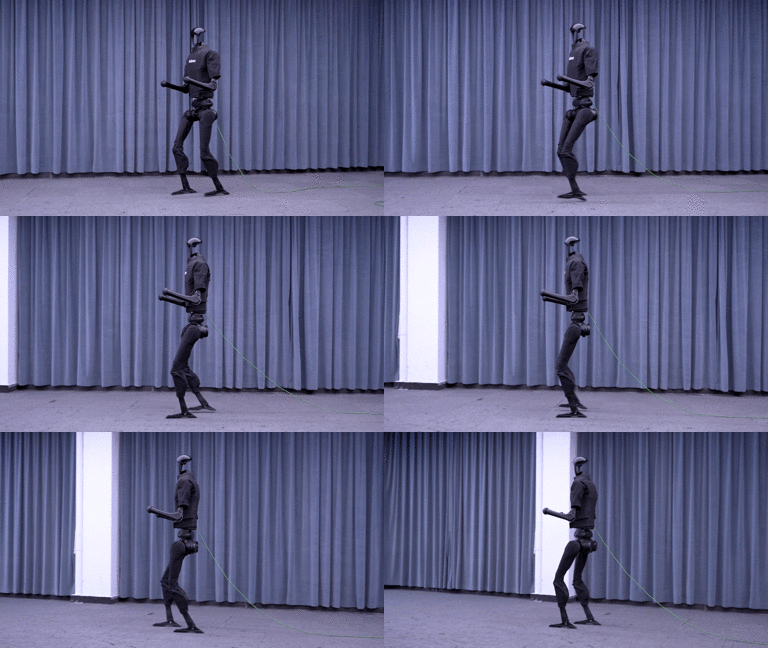
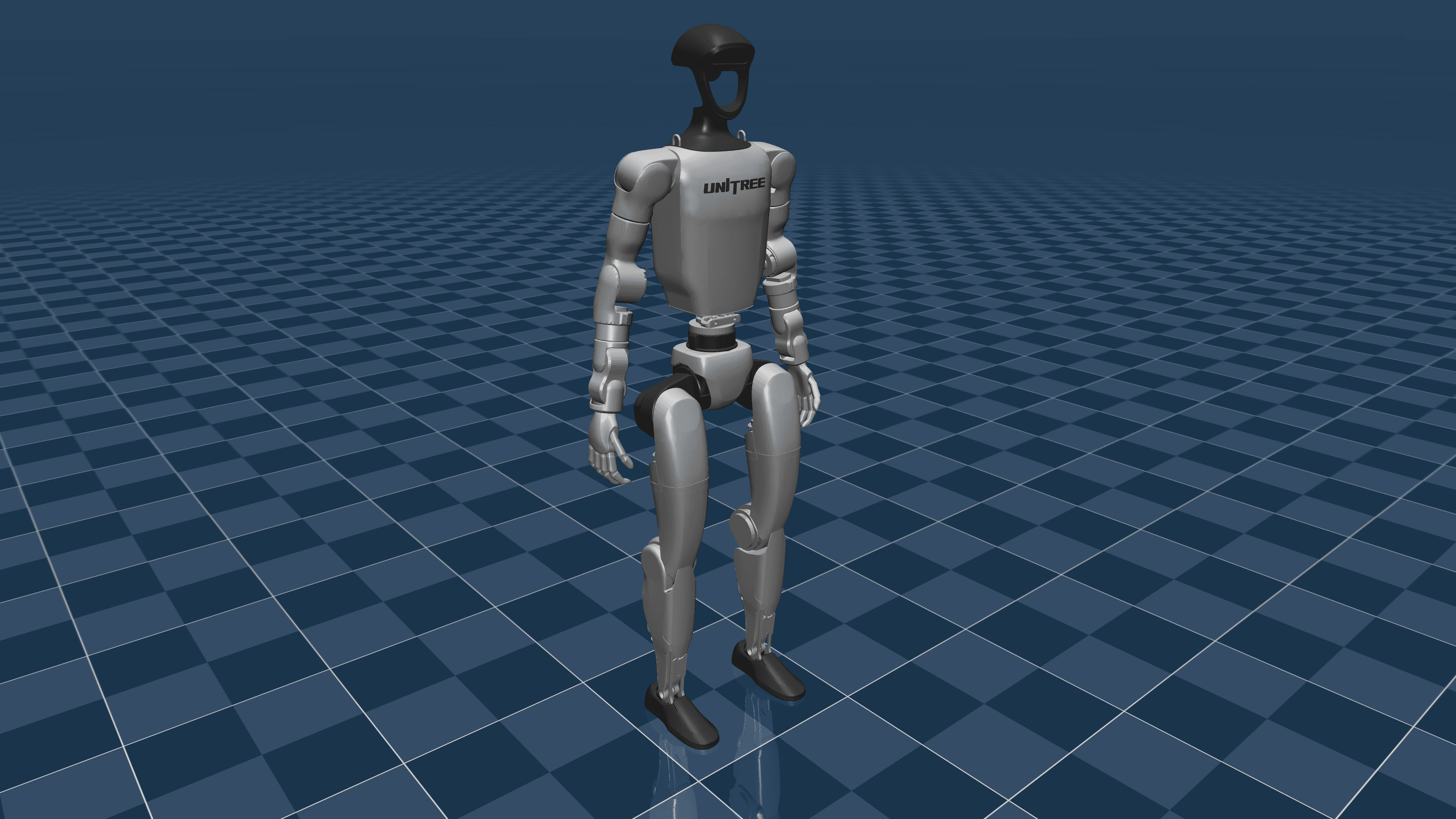
After two theory posts on MDP formulation and reward engineering, it is time to get our hands dirty with real training. In this post, we will train a complete walking policy for the Unitree G1 — from zero to walking robot — using PPO in Isaac Lab.
Unitree G1 — Technical Specifications
The Unitree G1 is a compact humanoid well-suited for research and practical applications:
| Parameter | Value |
|---|---|
| Height | 1.27 m |
| Weight | 35 kg |
| Total DOF | 23 (legs 12, arms 8, torso 3) |
| Leg DOF (per side) | 6 (hip roll/pitch/yaw, knee, ankle roll/pitch) |
| Max speed | ~2 m/s |
| Battery life | ~2 hours |
| Onboard compute | Jetson Orin NX |
| Price | ~$16,000 USD |
Compared to the H1 (1.8m, 47kg, 19 leg DOF), the G1 is smaller and easier to experiment with. But the lower center of mass also means different dynamics — similar to the difference between how children and adults walk.

Step 1: Load G1 URDF into Isaac Lab
Robot Model Configuration
"""
Step 1: Configure Unitree G1 in Isaac Lab.
File: g1_env_cfg.py
"""
import omni.isaac.lab.sim as sim_utils
from omni.isaac.lab.assets import ArticulationCfg
from omni.isaac.lab.envs import ManagerBasedRLEnvCfg
from omni.isaac.lab.managers import ObservationGroupCfg, ObservationTermCfg
from omni.isaac.lab.managers import RewardTermCfg, TerminationTermCfg
from omni.isaac.lab.scene import InteractiveSceneCfg
from omni.isaac.lab.terrains import TerrainImporterCfg
from omni.isaac.lab.utils import configclass

@configclass
class G1RobotCfg:
    """Unitree G1 robot configuration."""

    robot = ArticulationCfg(
        prim_path="/World/envs/env_.*/Robot",
        spawn=sim_utils.UsdFileCfg(
            usd_path="datasets/robots/unitree/g1/g1.usd",
            activate_contact_sensors=True,
        ),
        init_state=ArticulationCfg.InitialStateCfg(
            pos=(0.0, 0.0, 0.75),
            joint_pos={
                # === Left leg ===
                "left_hip_yaw": 0.0,
                "left_hip_roll": 0.0,
                "left_hip_pitch": -0.15,
                "left_knee": 0.35,
                "left_ankle_pitch": -0.20,
                "left_ankle_roll": 0.0,
                # === Right leg ===
                "right_hip_yaw": 0.0,
                "right_hip_roll": 0.0,
                "right_hip_pitch": -0.15,
                "right_knee": 0.35,
                "right_ankle_pitch": -0.20,
                "right_ankle_roll": 0.0,
                # Arms: slightly bent
                ".*shoulder.*": 0.0,
                ".*elbow.*": 0.3,
            },
        ),
        actuators={
            "legs": sim_utils.DCMotorCfg(
                joint_names_expr=[
                    ".*hip.*", ".*knee.*", ".*ankle.*"
                ],
                stiffness={
                    ".*hip.*": 150.0,
                    ".*knee.*": 200.0,
                    ".*ankle.*": 40.0,
                },
                damping={
                    ".*hip.*": 5.0,
                    ".*knee.*": 8.0,
                    ".*ankle.*": 2.0,
                },
                effort_limit=100.0,
            ),
            "arms": sim_utils.DCMotorCfg(
                joint_names_expr=[".*shoulder.*", ".*elbow.*"],
                stiffness=80.0,
                damping=4.0,
                effort_limit=50.0,
            ),
        },
    )
Full Environment Configuration
@configclass
class G1FlatWalkEnvCfg(ManagerBasedRLEnvCfg):
    """Complete environment for G1 flat-ground walking."""

    # === Simulation ===
    sim = sim_utils.SimulationCfg(
        dt=0.005,                    # 200 Hz physics
        render_interval=4,
        gravity=(0.0, 0.0, -9.81),
    )

    # === Scene ===
    scene = InteractiveSceneCfg(
        num_envs=4096,               # 4096 parallel environments
        env_spacing=2.5,
    )

    # === Terrain (flat ground) ===
    terrain = TerrainImporterCfg(
        prim_path="/World/ground",
        terrain_type="plane",
        physics_material=sim_utils.RigidBodyMaterialCfg(
            static_friction=1.0,
            dynamic_friction=1.0,
            restitution=0.0,
        ),
    )

    # === Robot ===
    robot = G1RobotCfg.robot

    # === Observations ===
    observations = ObservationGroupCfg(
        policy=ObservationGroupCfg(
            concatenate_terms=True,
            terms={
                "base_ang_vel": ObservationTermCfg(
                    func="base_ang_vel", noise={"mean": 0, "std": 0.05}
                ),
                "projected_gravity": ObservationTermCfg(
                    func="projected_gravity",
                ),
                "velocity_commands": ObservationTermCfg(
                    func="generated_commands",
                    params={"command_name": "base_velocity"},
                ),
                "joint_pos": ObservationTermCfg(
                    func="joint_pos_rel",
                    noise={"mean": 0, "std": 0.01},
                ),
                "joint_vel": ObservationTermCfg(
                    func="joint_vel_rel",
                    noise={"mean": 0, "std": 0.1},
                    scale=0.05,
                ),
                "actions": ObservationTermCfg(
                    func="last_action",
                ),
            },
        ),
    )

    # === Control ===
    decimation = 4                   # Policy at 50 Hz
    episode_length_s = 20.0

    # === Commands ===
    commands = {
        "base_velocity": {
            "ranges": {
                "lin_vel_x": (-0.5, 1.0),    # Forward/backward
                "lin_vel_y": (-0.3, 0.3),     # Lateral
                "ang_vel_z": (-0.5, 0.5),     # Yaw rate
            },
            "resampling_time": 10.0,
        },
    }
Step 2: Configure PPO Hyperparameters
PPO (Proximal Policy Optimization) is the most widely used algorithm for locomotion due to its stability and efficiency:
"""
Step 2: PPO training configuration.
File: g1_ppo_cfg.py
"""

class G1PPORunnerCfg:
    """PPO configuration for G1 walking."""

    # === Algorithm ===
    algorithm = {
        "class_name": "PPO",
        "clip_param": 0.2,           # PPO clip range
        "entropy_coef": 0.01,        # Encourage exploration
        "gamma": 0.99,               # Discount factor
        "lam": 0.95,                 # GAE lambda
        "learning_rate": 1e-3,       # Initial LR
        "lr_schedule": "adaptive",   # Reduce LR when KL divergence is high
        "desired_kl": 0.01,
        "max_grad_norm": 1.0,
        "num_learning_epochs": 5,    # Epochs per update
        "num_mini_batches": 4,
        "value_loss_coef": 1.0,
    }

    # === Policy network ===
    policy = {
        "class_name": "ActorCritic",
        "activation": "elu",
        "actor_hidden_dims": [512, 256, 128],
        "critic_hidden_dims": [512, 256, 128],
        "init_noise_std": 1.0,
    }

    # === Runner ===
    runner = {
        "num_steps_per_env": 24,     # Steps per env per update
        "max_iterations": 5000,      # Total iterations
        "save_interval": 500,
        "log_interval": 10,
    }
Key Hyperparameter Explanations
| Parameter | Value | Why? |
|---|---|---|
num_envs |
4096 | Enough data for stable gradients. Increase to 8192 if VRAM allows |
clip_param |
0.2 | Standard PPO. Reduce to 0.1 if training is unstable |
entropy_coef |
0.01 | Too high = random actions. Too low = local optima |
learning_rate |
1e-3 | Adaptive schedule auto-reduces when needed |
actor_hidden_dims |
[512,256,128] | Enough capacity for 23 DOF. Too small = underfitting |
num_steps_per_env |
24 | ~0.48s real-time per update. Increase to 48 for long-horizon tasks |
init_noise_std |
1.0 | High initial exploration, auto-decays |
Step 3: Reward Function for G1
Applying knowledge from the reward engineering post:
"""
Step 3: Reward terms for G1 walking.
File: g1_rewards.py
"""
import torch
from omni.isaac.lab.managers import RewardTermCfg

class G1RewardsCfg:
    """Reward configuration for G1 flat walking."""

    # === Primary tracking ===
    lin_vel_xy_tracking = RewardTermCfg(
        func="track_lin_vel_xy_exp",
        weight=1.5,
        params={"std": 0.25, "command_name": "base_velocity"},
    )
    ang_vel_z_tracking = RewardTermCfg(
        func="track_ang_vel_z_exp",
        weight=0.8,
        params={"std": 0.25, "command_name": "base_velocity"},
    )

    # === Posture ===
    flat_orientation = RewardTermCfg(
        func="flat_orientation_l2", weight=-1.0,
    )
    base_height = RewardTermCfg(
        func="base_height_l2",
        weight=-0.5,
        params={"target_height": 0.72},
    )

    # === Regularization ===
    action_rate = RewardTermCfg(
        func="action_rate_l2", weight=-0.01,
    )
    joint_torques = RewardTermCfg(
        func="joint_torques_l2", weight=-5e-5,
    )
    joint_accel = RewardTermCfg(
        func="joint_accel_l2", weight=-1e-4,
    )

    # === Gait ===
    feet_air_time = RewardTermCfg(
        func="feet_air_time",
        weight=0.2,
        params={"threshold": 0.3, "sensor_cfg": "contact_forces"},
    )
    undesired_contacts = RewardTermCfg(
        func="undesired_contacts",
        weight=-1.0,
        params={
            "sensor_cfg": "contact_forces",
            "threshold": 1.0,
            "body_names": [".*knee.*", ".*torso.*", ".*hip.*"],
        },
    )

    # === Termination ===
    termination_penalty = RewardTermCfg(
        func="is_terminated", weight=-200.0,
    )

    # === Velocity penalty ===
    lin_vel_z = RewardTermCfg(
        func="lin_vel_z_l2", weight=-0.5,
    )
    ang_vel_xy = RewardTermCfg(
        func="ang_vel_xy_l2", weight=-0.05,
    )

Step 4: Run Training
Training Commands
# Training on RTX 4090 — approximately 45-60 minutes
cd IsaacLab
python source/standalone/workflows/rsl_rl/train.py \
    --task=Isaac-Velocity-Flat-G1-v0 \
    --num_envs=4096 \
    --max_iterations=5000 \
    --headless

# With WandB logging
python source/standalone/workflows/rsl_rl/train.py \
    --task=Isaac-Velocity-Flat-G1-v0 \
    --num_envs=4096 \
    --max_iterations=5000 \
    --headless \
    --logger wandb \
    --wandb_project g1-locomotion
Typical Training Schedule
Iteration 0-200:    Robot falls constantly, reward ~-100
Iteration 200-500:  Starts standing, reward ~-20 to 0
Iteration 500-1500: First steps! reward increases to 5-10
Iteration 1500-3000: Stable walking, reward ~10-15
Iteration 3000-5000: Fine-tuning, reward ~15-20 (plateau)
Monitoring Training
"""
Script to monitor training progress.
File: monitor_training.py
"""
import matplotlib.pyplot as plt
import json
import glob
import numpy as np

def plot_training_curves(log_dir):
    """Plot key metrics during training."""

    # Metrics to track
    metrics = {
        "reward/total": [],
        "reward/lin_vel_tracking": [],
        "reward/termination": [],
        "loss/policy": [],
        "loss/value": [],
        "diagnostics/mean_episode_length": [],
    }

    fig, axes = plt.subplots(2, 3, figsize=(18, 10))

    # Plot 1: Total reward
    axes[0, 0].set_title("Total Reward")
    axes[0, 0].set_xlabel("Iteration")
    axes[0, 0].set_ylabel("Reward")

    # Plot 2: Velocity tracking
    axes[0, 1].set_title("Velocity Tracking Reward")

    # Plot 3: Episode length (longer = robot doesn't fall)
    axes[0, 2].set_title("Episode Length (s)")

    # Plot 4: Policy loss
    axes[1, 0].set_title("Policy Loss")

    # Plot 5: Value loss
    axes[1, 1].set_title("Value Loss")

    # Plot 6: Termination rate
    axes[1, 2].set_title("Termination Rate")

    plt.tight_layout()
    plt.savefig("training_curves.png", dpi=150)
    print("Saved training_curves.png")

if __name__ == "__main__":
    plot_training_curves("logs/g1_flat_walk")
Step 5: Evaluate the Policy
Running the Trained Policy
# Evaluate with rendering
python source/standalone/workflows/rsl_rl/play.py \
    --task=Isaac-Velocity-Flat-G1-v0 \
    --num_envs=16 \
    --checkpoint=logs/g1_flat_walk/model_5000.pt

# Record video
python source/standalone/workflows/rsl_rl/play.py \
    --task=Isaac-Velocity-Flat-G1-v0 \
    --num_envs=1 \
    --checkpoint=logs/g1_flat_walk/model_5000.pt \
    --video \
    --video_length=300
Quantitative Evaluation
"""
Evaluate walking policy quality.
File: evaluate_g1.py
"""
import torch
import numpy as np

class G1PolicyEvaluator:
    """Evaluate walking policy on multiple criteria."""

    def __init__(self, env, policy, num_eval_steps=1000):
        self.env = env
        self.policy = policy
        self.num_eval_steps = num_eval_steps

    def evaluate(self):
        """Run full evaluation."""
        metrics = {
            "velocity_tracking_error": [],
            "energy_per_meter": [],
            "survival_rate": [],
            "gait_symmetry": [],
            "smoothness": [],
        }

        obs = self.env.reset()
        for step in range(self.num_eval_steps):
            action = self.policy(obs)
            obs, reward, done, info = self.env.step(action)

            # 1. Velocity tracking error
            cmd_vel = info["velocity_command"][:, 0]
            actual_vel = info["base_lin_vel"][:, 0]
            vel_error = torch.abs(cmd_vel - actual_vel).mean().item()
            metrics["velocity_tracking_error"].append(vel_error)

            # 2. Energy consumption (Cost of Transport)
            torques = info["applied_torques"]
            joint_vel = info["joint_velocities"]
            power = torch.sum(torch.abs(torques * joint_vel), dim=1)
            velocity = torch.norm(info["base_lin_vel"][:, :2], dim=1)
            cot = power / (35.0 * 9.81 * torch.clamp(velocity, min=0.1))
            metrics["energy_per_meter"].append(cot.mean().item())

            # 3. Gait symmetry
            left_phase = info["left_foot_contact_time"]
            right_phase = info["right_foot_contact_time"]
            symmetry = 1.0 - torch.abs(
                left_phase - right_phase
            ).mean().item()
            metrics["gait_symmetry"].append(symmetry)

        # Aggregate results
        results = {}
        for key, values in metrics.items():
            results[key] = {
                "mean": np.mean(values),
                "std": np.std(values),
            }

        # Print report
        print("=" * 50)
        print("G1 Walking Policy Evaluation")
        print("=" * 50)
        print(f"Vel tracking error: {results['velocity_tracking_error']['mean']:.3f} "
              f"+/- {results['velocity_tracking_error']['std']:.3f} m/s")
        print(f"Cost of Transport:  {results['energy_per_meter']['mean']:.2f} "
              f"+/- {results['energy_per_meter']['std']:.2f}")
        print(f"Gait symmetry:      {results['gait_symmetry']['mean']:.3f}")
        print(f"(Human CoT ~ 0.2, Good robot CoT < 1.0)")

        return results
Tips for Stable Training
1. Observation Normalization (REQUIRED)
# In config
normalize_observations = True
clip_observations = 100.0
2. Reward Scaling
# Clip rewards to avoid outliers
clip_rewards = True
max_reward = 50.0
min_reward = -200.0
3. Action Smoothing Penalty
# If robot is jerky, increase action_rate weight
action_rate_weight = -0.01  # Default
# If still jerky:
action_rate_weight = -0.05  # Increase 5x
4. Gradient Clipping
max_grad_norm = 1.0  # Clip gradient L2 norm
# Prevents gradient explosion when reward has spikes
5. Early Termination Conditions
class G1TerminationsCfg:
    """Episode termination conditions."""

    # Fall (base height too low)
    base_contact = TerminationTermCfg(
        func="illegal_contact",
        params={
            "sensor_cfg": "contact_forces",
            "threshold": 1.0,
            "body_names": ["torso", ".*head.*"],
        },
    )

    # Excessive tilting (> 60 degrees)
    bad_orientation = TerminationTermCfg(
        func="bad_orientation",
        params={"limit_angle": 1.05},  # ~60 degrees
    )

    # Timeout
    time_out = TerminationTermCfg(
        func="time_out",
        time_out=True,  # Don't apply termination penalty for timeout
    )
For more on Isaac Lab, see Isaac Lab: GPU-Accelerated Simulation. For traditional humanoid control, see Humanoid Control Methods.

Summary
In this post, we completed the full training pipeline for the Unitree G1:
- Loaded G1 URDF with appropriate joint configuration and PD gains
- Configured PPO with 4096 envs, adaptive learning rate
- Designed 13 reward terms balancing tracking, posture, and smoothness
- Trained for ~1 hour on RTX 4090, achieving stable walking
- Evaluated velocity tracking, energy efficiency, gait symmetry
Typical results: velocity tracking error < 0.15 m/s, Cost of Transport < 0.8, gait symmetry > 0.9.
Next post — Unitree G1: Terrain Adaptation — extends the policy to complex terrains: stairs, slopes, and rough ground.
References
- Humanoid-Gym: Reinforcement Learning for Humanoid Robot with Zero-Shot Sim-to-Real Transfer — Gu et al., 2024
- Proximal Policy Optimization Algorithms — Schulman et al., 2017
- Isaac Lab: A Unified Framework for Robot Learning — Mittal et al., 2025
- Learning Agile and Dynamic Motor Skills for Legged Robots — Hwangbo et al., Science Robotics, 2019