From Classical to RL: The Turning Point in Locomotion
In Part 1, we learned the classical methods (ZMP, CPG, IK) and why they're limited. Now it's time to dive into RL-based locomotion -- the approach that has dominated the field since 2020.
The core idea is extremely simple: instead of hand-crafting a controller, let the robot learn how to walk through trial-and-error in simulation. But "simple" doesn't mean "easy" -- there are many important decisions to understand.

MDP for Walking: Problem Formulation
Locomotion is formulated as a Markov Decision Process (MDP). If you're not familiar with MDPs, read RL Basics for Robotics first.
Observation Space -- What Does the Robot "See"?
Observation is all the information the policy receives to make decisions. For locomotion, observation typically includes:
observation_space = {
    # === Proprioception ===
    "base_angular_velocity": 3,    # gyroscope (roll, pitch, yaw rates)
    "projected_gravity": 3,        # direction of gravity in body frame
    "joint_positions": 12,         # angles of 12 joints (3 joints x 4 legs)
    "joint_velocities": 12,        # angular velocities of 12 joints

    # === Commands ===
    "velocity_command": 3,         # desired (vx, vy, yaw_rate)

    # === History ===
    "previous_actions": 12,        # previous actions

    # TOTAL: 45 dimensions
}
Why not use visual input? Most locomotion policies use only proprioception (joint angles, IMU) without cameras. Reasons:
- Proprioception is enough to walk on many terrains (robot "feels" ground through feet)
- Visual input increases observation dimension to thousands → slower training
- Cameras have latency, noise, and large sim-to-real gap
However, newer papers like "Learning Robust Perceptive Locomotion for Quadrupedal Robots in the Wild" (arXiv:2201.08117) have begun combining depth cameras + proprioception for more complex terrain (stairs, bumps).
Action Space -- What Does the Robot Do?
Action space defines how the robot controls its joints:
| Action Type | Description | Advantages | Disadvantages |
|---|---|---|---|
| Joint position targets | Policy outputs desired joint angles | Stable, easy sim-to-real | Doesn't directly control force |
| Joint torques | Policy outputs torques on joints | Precise control | Hard to train, hard to transfer |
| Position offsets | Output deltas from default standing pose | Faster training | Needs good default pose |
Most common today: Position offsets + PD controller. Policy outputs joint angle deltas, PD controller converts to torques:
# Action -> Joint torques (run on robot)
def pd_controller(target_pos, current_pos, current_vel, kp=40.0, kd=2.0):
    """
    PD controller converts position targets to torques
    kp, kd: proportional and derivative gains
    """
    torque = kp * (target_pos - current_pos) - kd * current_vel
    return np.clip(torque, -33.5, 33.5)  # torque limit

# In training loop
default_pose = np.array([0.0, 0.8, -1.6] * 4)  # standing pose for 4 legs
action = policy(observation)  # output: 12 position offsets
target_positions = default_pose + action * action_scale  # scale action
torques = pd_controller(target_positions, current_joint_pos, current_joint_vel)
Reward Shaping -- The Art of Designing Rewards
The reward function is the most important part of locomotion RL. A good reward function creates smooth walking; a bad reward function creates jerky, jumping, or energy-wasting robots.
Reward Components
Reward function for locomotion is typically a weighted sum of multiple components:
def compute_reward(env):
    """
    Reward function for quadruped locomotion
    Each component has its own weight -- tuning weights is an art
    """
    rewards = {}

    # === Rewards (encouraging) ===

    # 1. Track velocity command
    lin_vel_error = (env.commands[:, :2] - env.base_lin_vel[:, :2]).square().sum(dim=1)
    rewards["tracking_lin_vel"] = torch.exp(-lin_vel_error / 0.25) * 1.5

    ang_vel_error = (env.commands[:, 2] - env.base_ang_vel[:, 2]).square()
    rewards["tracking_ang_vel"] = torch.exp(-ang_vel_error / 0.25) * 0.5

    # === Penalties (discouraging) ===

    # 2. Energy -- penalize power consumption
    rewards["torques"] = -torch.sum(env.torques.square(), dim=1) * 0.00001

    # 3. Smoothness -- penalize sudden action changes
    rewards["action_rate"] = -torch.sum(
        (env.actions - env.last_actions).square(), dim=1
    ) * 0.01

    # 4. Air time -- encourage foot clearance (foot leaving ground)
    contact = env.foot_contacts  # True if foot touches ground
    first_contact = (env.feet_air_time > 0.) * contact
    rewards["feet_air_time"] = torch.sum(
        (env.feet_air_time - 0.5) * first_contact, dim=1
    ) * 1.0

    # 5. Orientation -- penalize excessive tilting
    rewards["orientation"] = -torch.sum(
        env.projected_gravity[:, :2].square(), dim=1
    ) * 0.2

    # 6. Joint limits -- penalize operating near joint limits
    rewards["joint_limits"] = -torch.sum(
        (env.dof_pos - env.dof_pos_limits[:, 0]).clip(max=0.).square() +
        (env.dof_pos - env.dof_pos_limits[:, 1]).clip(min=0.).square(),
        dim=1
    ) * 10.0

    # 7. Collision -- penalize body touching ground (not feet)
    rewards["collision"] = -torch.sum(
        (torch.norm(env.contact_forces[:, env.penalized_bodies, :], dim=-1) > 0.1),
        dim=1
    ).float() * 1.0

    # Total reward
    total_reward = sum(rewards.values())
    return total_reward, rewards
Reward Design Tips from Experience
| Tip | Explanation |
|---|---|
| Exponential tracking reward | Use exp(-error/sigma) instead of -error. Gives better gradient when error is large |
| Balance reward weights | Tracking reward should be largest (~1.5), penalties should be small (~0.001-0.1) |
| Feet air time | This reward is critically important -- without it, robot will drag feet on ground |
| Action rate penalty | Implicitly smooths movement, prevents jerky robot behavior |
| Base height reward | Add if robot tends to crouch -- encourage standing upright |

Curriculum Learning -- From Easy to Hard
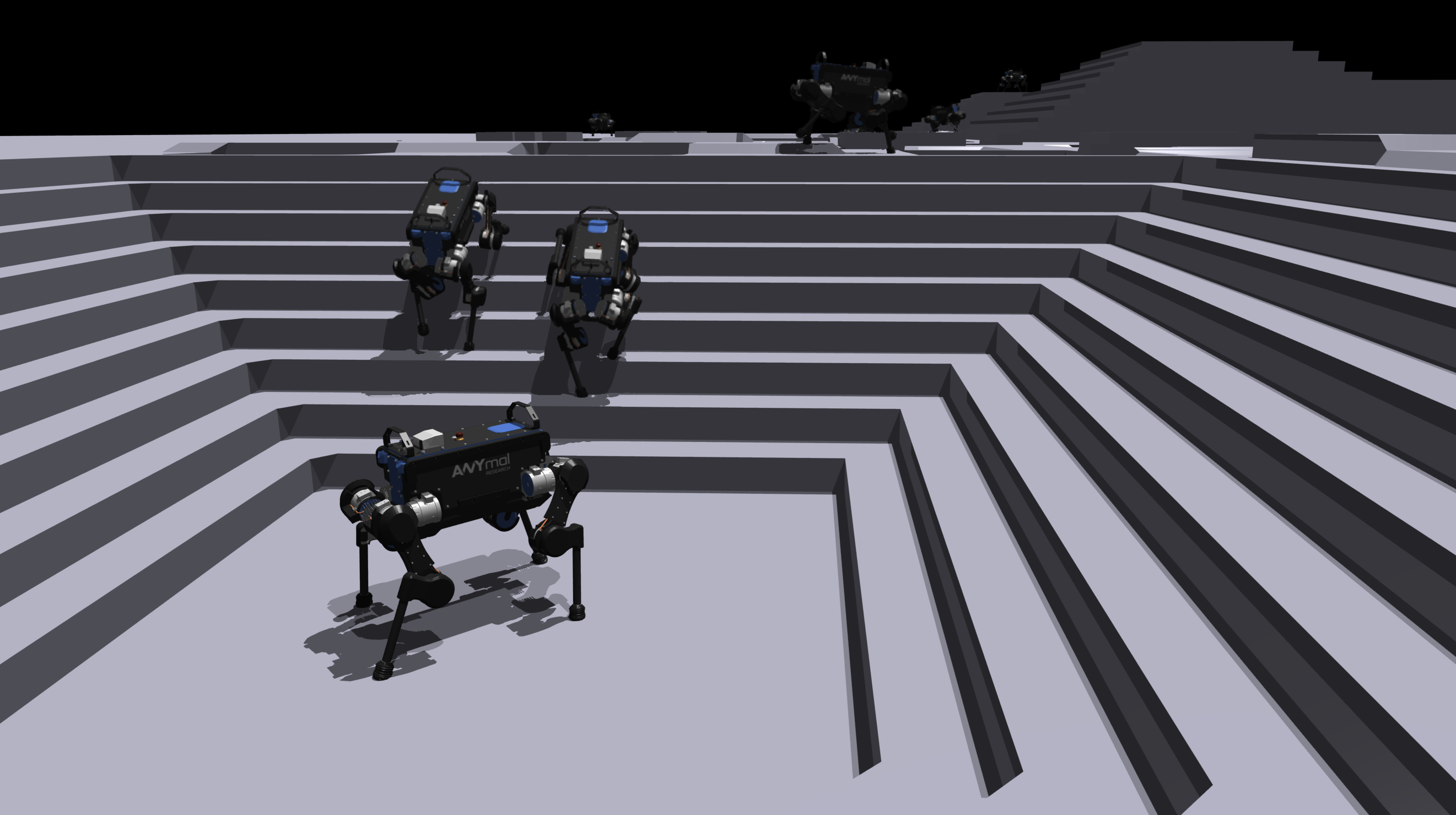
One of the biggest breakthroughs for locomotion RL is curriculum learning -- start training on easy terrain, gradually increase difficulty. Without curriculum, the robot fails to learn from the start.
Terrain Curriculum
class TerrainCurriculum:
    """
    Game-inspired curriculum (from legged_gym paper)
    Robot "levels up" when completing current terrain
    """
    def __init__(self):
        self.terrain_levels = {
            0: "flat",           # flat ground
            1: "rough_02",       # light roughness (max height 2cm)
            2: "rough_05",       # medium roughness (max height 5cm)
            3: "rough_10",       # heavy roughness (max height 10cm)
            4: "slopes_10deg",   # slopes 10 degrees
            5: "slopes_20deg",   # slopes 20 degrees
            6: "stairs_10cm",    # stairs 10cm
            7: "stairs_15cm",    # stairs 15cm
            8: "stepping_stones", # rocks to step over
            9: "random_mixed",   # combination of all
        }

    def update_level(self, robot_id, distance_walked):
        """
        If robot walks far → level up
        If robot falls frequently → hold or lower level
        """
        if distance_walked > self.threshold_up:
            self.levels[robot_id] = min(
                self.levels[robot_id] + 1,
                self.max_level
            )
        elif distance_walked < self.threshold_down:
            self.levels[robot_id] = max(
                self.levels[robot_id] - 1,
                0
            )
Command Curriculum
In addition to terrain, velocity commands are also curricularized:
- Stage 1: Only low velocity commands (0-0.5 m/s), straight walking only
- Stage 2: Increase speed (0-1.5 m/s), add left/right turns
- Stage 3: High speed (0-3.0 m/s), add backward and lateral walking
PPO Training Pipeline with Isaac Lab
Pipeline Overview
Isaac Lab Environment
    ↓
4,096 parallel robots (GPU)
    ↓
Observations (45 dims x 4096 robots)
    ↓
PPO Policy (MLP: 512-256-128)
    ↓
Actions (12 dims x 4096 robots)
    ↓
Environment step (GPU physics)
    ↓
Rewards + Terminations
    ↓
PPO Update (on-policy)
    ↓
Repeat ~2000 iterations (~20 minutes on RTX 4090)
PPO -- Why PPO?
Proximal Policy Optimization (Schulman et al., 2017) is the default algorithm for locomotion because:
- On-policy: Collects new data each iteration, suitable for fast simulation (4096 envs)
- Stable: Clip ratio prevents policy change too much, avoids catastrophic forgetting
- Parallel-friendly: RSL-RL implementation optimized for GPU rollout collection
# PPO training config (Isaac Lab / RSL-RL)
ppo_config = {
    "policy": {
        "class_name": "ActorCritic",
        "hidden_dims": [512, 256, 128],
        "activation": "elu",
        "init_noise_std": 1.0,
    },
    "algorithm": {
        "value_loss_coef": 1.0,
        "use_clipped_value_loss": True,
        "clip_param": 0.2,
        "entropy_coef": 0.01,
        "num_learning_epochs": 5,
        "num_mini_batches": 4,
        "learning_rate": 1e-3,
        "schedule": "adaptive",  # decrease lr when KL divergence is small
        "gamma": 0.99,
        "lam": 0.95,
        "desired_kl": 0.01,
        "max_grad_norm": 1.0,
    },
    "runner": {
        "num_steps_per_env": 24,  # rollout length
        "max_iterations": 1500,
    }
}
Policy Architecture
Policy for locomotion is usually a simple MLP -- no need for complex transformers or CNNs:
import torch
import torch.nn as nn

class LocomotionPolicy(nn.Module):
    """
    Actor-Critic MLP for locomotion
    Simple but effective -- no need for more complexity
    """
    def __init__(self, obs_dim=45, action_dim=12):
        super().__init__()

        # Separate backbones for Actor and Critic
        # Better for locomotion than shared backbone

        self.actor = nn.Sequential(
            nn.Linear(obs_dim, 512),
            nn.ELU(),
            nn.Linear(512, 256),
            nn.ELU(),
            nn.Linear(256, 128),
            nn.ELU(),
            nn.Linear(128, action_dim),
        )

        self.critic = nn.Sequential(
            nn.Linear(obs_dim, 512),
            nn.ELU(),
            nn.Linear(512, 256),
            nn.ELU(),
            nn.Linear(256, 128),
            nn.ELU(),
            nn.Linear(128, 1),
        )

        self.log_std = nn.Parameter(torch.zeros(action_dim))

    def forward(self, obs):
        action_mean = self.actor(obs)
        value = self.critic(obs)
        return action_mean, self.log_std.exp(), value
Hands-on: Train with Isaac Lab
# 1. Setup Isaac Lab
git clone https://github.com/isaac-sim/IsaacLab.git
cd IsaacLab && ./isaaclab.sh --install

# 2. Train ANYmal locomotion
python source/standalone/workflows/rsl_rl/train.py \
    --task Isaac-Velocity-Rough-Anymal-D-v0 \
    --num_envs 4096 \
    --max_iterations 1500

# 3. See results
python source/standalone/workflows/rsl_rl/play.py \
    --task Isaac-Velocity-Rough-Anymal-D-v0 \
    --num_envs 64
Training takes about 20 minutes on RTX 4090 for 1500 iterations. The policy converges and the robot can walk on rough terrain, climb slopes, and follow velocity commands.
Domain Randomization for Sim-to-Real
To make a policy trained in sim work on a real robot, we need domain randomization -- randomly vary physical parameters in simulation:
domain_randomization = {
    # Dynamics randomization
    "friction_range": [0.5, 1.25],        # friction coefficient
    "restitution_range": [0.0, 0.4],       # bounce
    "added_mass_range": [-1.0, 3.0],       # added mass to base (kg)
    "com_displacement_range": [-0.15, 0.15], # COM displacement (m)

    # Motor randomization
    "motor_strength_range": [0.9, 1.1],    # motor variation
    "motor_offset_range": [-0.02, 0.02],   # encoder offset (rad)

    # Observation noise
    "joint_pos_noise": 0.01,    # rad
    "joint_vel_noise": 1.5,     # rad/s
    "gravity_noise": 0.05,      # m/s^2
    "imu_noise": 0.2,           # rad/s

    # Latency
    "action_delay_range": [0, 2],  # frames delay
}
With domain randomization, the policy learns to be robust to uncertainty -- doesn't rely on specific sim parameters.
Training Monitoring -- Knowing When Policy is Learning Well
| Metric | Meaning | Good Value |
|---|---|---|
| Mean reward | Average total reward | Increases steadily, converges |
| Mean episode length | How long robot survives | Increases to max (20s) |
| Tracking error | Error between command and actual velocity | Decreases to ~0.1 m/s |
| Feet air time | Time foot is in the air | ~0.3-0.5s (natural gait) |
| Power consumption | Energy usage | Decreases (more efficient) |
If mean episode length doesn't increase after 200 iterations, likely reward function issue -- check weights.

Comparison: RL vs Classical for Locomotion
| Criteria | Classical (ZMP/CPG/IK) | RL (PPO) |
|---|---|---|
| Setup time | Months (tuning) | Hours (reward + train) |
| Terrain generalization | Need replanning | Train once, run many terrains |
| Optimality | Sub-optimal | Near optimal for reward function |
| Interpretability | High (know what robot is doing) | Low (black box) |
| Safety guarantees | Can prove stability | No formal guarantees |
| Compute requirement | CPU sufficient | Need strong GPU |
| Sim-to-real | Don't need sim | Need sim + domain randomization |
Next in the Series
You've now understood how to formulate locomotion as an RL problem and the entire training pipeline. In upcoming posts:
- Part 3: Quadruped Locomotion: legged_gym to Unitree Go2 -- Hands-on training and deployment on real robot
- Part 4: Walk These Ways: Adaptive Locomotion One Policy -- Analysis of paper on multi-gait learning
Related Posts
- Locomotion Basics: From ZMP to CPG -- Part 1: theoretical foundation
- Quadruped Locomotion: legged_gym to Unitree Go2 -- Part 3 of the series
- RL Basics for Robotics: From Markov to PPO -- RL fundamentals before this series
- NVIDIA Isaac Lab: GPU-accelerated RL Training from Zero -- Simulator for locomotion training
- Sim-to-Real Transfer: Train Simulation, Run Reality -- Domain randomization and best practices