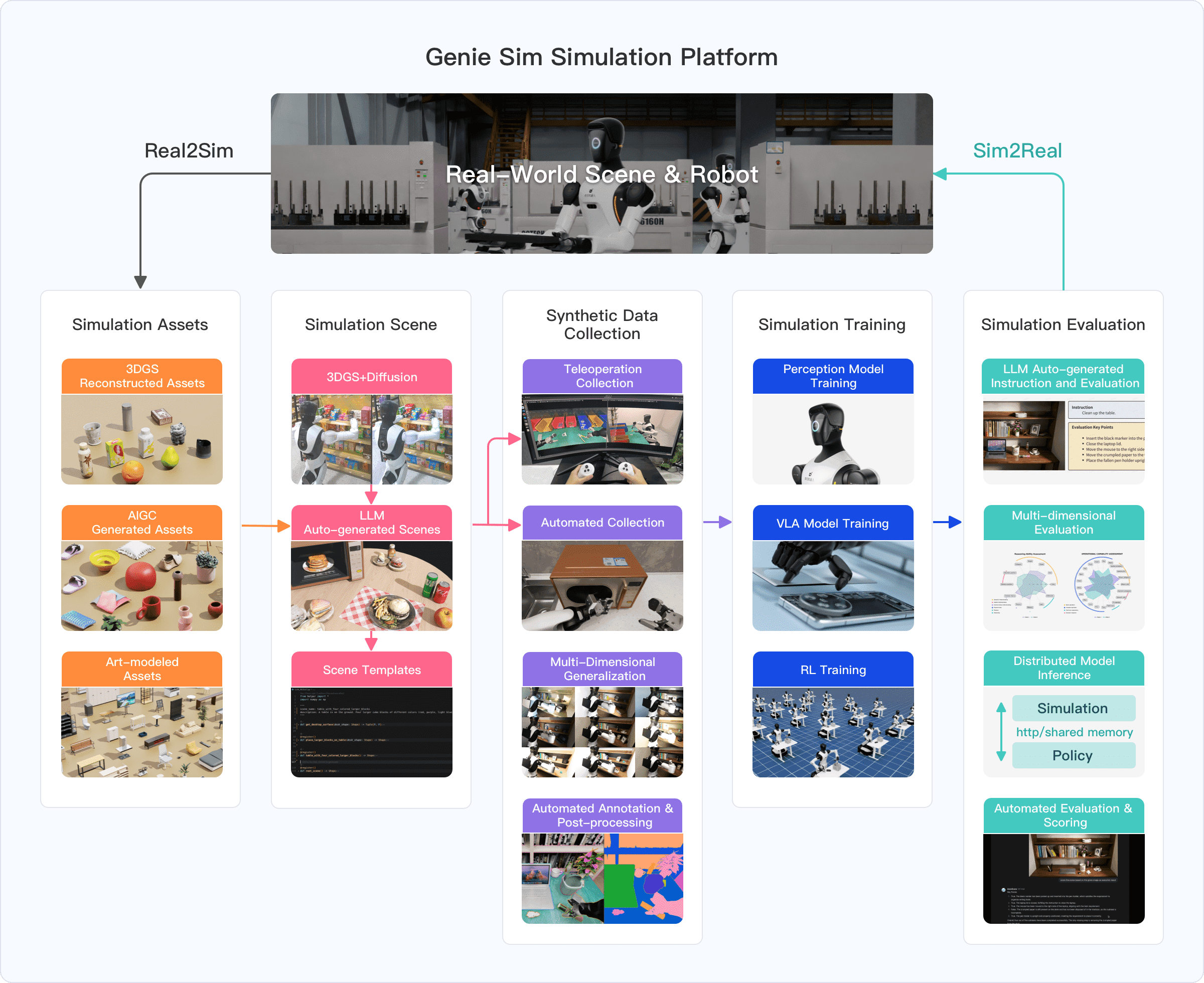
Want to train a humanoid robot for object manipulation but don't have a million-dollar lab? Genie Sim 3.0 from AGIBOT solves exactly that — an open-source simulation platform built on NVIDIA Isaac Sim that lets you generate thousands of training scenes using natural language prompts. Unveiled at CES 2026, Genie Sim 3.0 is the first platform to integrate the complete pipeline: environment reconstruction → scene generation → data collection → training → closed-loop evaluation.
In this tutorial, we'll walk through the architecture, installation, training pipeline, and the impressive sim-to-real transfer results (R² = 0.924).
Why Genie Sim 3.0?
Training humanoid robots in the real world faces three major barriers:
- Data cost — Collecting 500 real-world episodes for a single task takes weeks of human effort and equipment.
- Scene diversity — Robots need to generalize across thousands of variations (object positions, lighting, sensor noise) that can't be created manually.
- Evaluation loop — Testing new models on physical robots is risky, slow, and not reproducible.
Genie Sim 3.0 addresses all three: large-scale synthetic data generation (10,000+ hours), LLM-driven diverse scene creation, and fully simulated closed-loop evaluation.

Architecture Overview — 4 Core Subsystems
Genie Sim 3.0 consists of four tightly integrated modules:
1. Genie Sim Generator — LLM-Driven Scene Creation
This is the biggest differentiator from traditional platforms. Instead of manually designing scenes in an editor, you describe them in natural language and the LLM generates everything.
The 4-stage pipeline:
- Intention Interpreter — Converts natural language prompts into structured JSON task specs using chain-of-thought reasoning.
- Assets Index — RAG system with 5,140 simulation-ready 3D objects across 353 categories (retail, industry, catering, home, office). Uses QWEN text-embedding-v4 (2048-dim) + ChromaDB for semantic search.
- DSL Code Generator — Produces executable Python code following Isaac Sim's scene language spec.
- Results Assembler — Instantiates hierarchical scene graphs with OpenUSD Schema. Can generate thousands of diverse scenes within minutes.
Example: you say "Place 5 random colored cans on a kitchen table, robot needs to sort by color" → the LLM finds matching assets, generates randomized placement code, and creates a training-ready scene.
2. Environment Reconstruction — Real-to-Sim Pipeline
This module converts real-world spaces into simulation-ready digital twins:
- 3D Gaussian Splatting (3DGS) for photorealistic neural rendering.
- Camera pose optimization: SuperPoint + LightGlue (replacing traditional SIFT) combined with LiDAR SLAM + bundle adjustment.
- Generative view extrapolation: Difix3D+ diffusion model supplements insufficient camera viewpoints.
- Mesh reconstruction: PGSR (Planar-based Gaussian Splatting) for high-precision geometry.
The impressive part: a single 60-second orbital video is enough to generate a simulation-ready asset. AGIBOT uses their MetaCam scanner (RGB + 360° LiDAR + RTK) for large-scale capture.
3. Data Collection Framework — Automated Data Gathering
Two collection modes:
- Teleoperation mode — Operators use a PICO VR headset to send target end-effector poses to the motion controller. The system logs joint states, visual observations, and object poses.
- Automated mode — cuRobo GPU-accelerated motion planner + LLM-based task generation + GraspNet grasp pose annotations + waypoint filtering with trajectory evaluation. Includes a recovery mechanism that auto-resumes after task failures.
4. Closed-loop Evaluation (Genie Sim Benchmark)
Evaluates models across 5 capability dimensions:
| Dimension | Description |
|---|---|
| Instruction following | Robot understands and executes commands correctly |
| Spatial understanding | Recognizes positions, distances, orientations |
| Manipulation skills | Precise grasping, placing, pushing |
| Robustness | Handles lighting noise, sensor noise, disturbances |
| Sim-to-real transfer | Performance transfer from sim to real |
Communication uses HTTP protocol between the simulator and inference service. A VLM performs automated assessment with evidence-based scoring.
System Requirements
Genie Sim 3.0 runs on NVIDIA Isaac Sim 5.1.0, so hardware requirements are substantial:
| Component | Minimum | Recommended |
|---|---|---|
| OS | Ubuntu 22.04/24.04 | Ubuntu 22.04 LTS |
| GPU | NVIDIA RTX 4080 (16 GB VRAM) | RTX 5080 (48 GB VRAM) |
| CPU | Intel Core i7 Gen 7 / AMD Ryzen 5 | i9 X-series / Threadripper |
| RAM | 32 GB | 64 GB |
| Storage | 50 GB SSD | 1 TB NVMe SSD |
| Driver | NVIDIA 580.65.06+ | Latest |
| Python | 3.11 | 3.11 |
Important note: The GPU must have RT Cores (RTX series). Compute-only GPUs like A100 and H100 are not supported because Isaac Sim requires ray-tracing hardware.
Step-by-Step Installation
Step 1: Install NVIDIA Isaac Sim 5.1
# Install NVIDIA Omniverse Launcher
# Download from: https://developer.nvidia.com/omniverse
# Then install Isaac Sim 5.1.0 via the Launcher

# Or use pip (headless mode)
pip install isaacsim==5.1.0
Step 2: Clone Genie Sim repository
git clone https://github.com/AgibotTech/genie_sim.git
cd genie_sim
Step 3: Install dependencies
# Create conda environment
conda create -n geniesim python=3.11 -y
conda activate geniesim

# Install requirements
pip install -r requirements.txt
Step 4: Download assets
Assets are hosted on ModelScope and HuggingFace:
# Download 3D assets (5,140 objects)
python scripts/download_assets.py --source modelscope

# Or from HuggingFace
python scripts/download_assets.py --source huggingface
Step 5: Verify installation
# Run demo scene
python scripts/run_demo.py --scene kitchen_basic
If you see the Isaac Sim window displaying a kitchen scene with a robot, the installation is successful.

Training Pipeline
Genie Sim 3.0 supports two main training approaches:
Approach 1: Imitation Learning with VLA Models
This is the paper's primary focus. The workflow:
1. Generate scenes + collect demonstrations:
# Generate 1000 scene variations for a "pick and place" task
python -m geniesim.generator \
  --prompt "Robot picks colored cans from table and sorts by color" \
  --num_scenes 1000

# Automated data collection
python -m data_collection.auto_collect \
  --task pick_sort_color \
  --episodes 1500 \
  --robot agibot_g1
2. Fine-tune a VLA model:
Genie Sim supports multiple VLA models: pi-0.5, GO-1, UniVLA, RDT, X-VLA, GR00T-N1.6. Example with pi-0.5:
# Export dataset to compatible format
python -m data_collection.export \
  --format pi05 \
  --output ./datasets/pick_sort

# Fine-tune (requires multi-GPU)
python -m geniesim.train \
  --model pi-0.5 \
  --dataset ./datasets/pick_sort \
  --episodes 1500 \
  --output ./checkpoints/pi05_pick_sort
3. Closed-loop evaluation:
# Start inference server
python -m geniesim.inference_server \
  --model ./checkpoints/pi05_pick_sort \
  --port 8080

# Run benchmark
python -m geniesim.benchmark \
  --server http://localhost:8080 \
  --suite instruction_following \
  --trials 250
Approach 2: Reinforcement Learning with RLinf
For tasks requiring high precision (micro-manipulation), Genie Sim integrates RLinf — a massively parallel RL framework:
# Train RL policy for grasping
python -m geniesim.rl_train \
  --task precise_grasp \
  --algo ppo \
  --num_envs 4096 \
  --physics_freq 1000 \
  --total_steps 10_000_000
Key strengths of RLinf:
- Physics engine runs at 1000 Hz (decoupled from rendering).
- Standardized Gym interfaces for ecosystem compatibility.
- Designed as RL post-training on top of VLA pre-training: VLA provides "generalized understanding," RL provides "precise micromanipulation."
Results: Impressive Sim-to-Real Transfer
This is the most striking part. AGIBOT tested on 4 tasks with the Agibot G1 robot:
| Task | Real (200 eps) | Real (500 eps) | Sim (500 eps) | Sim (1500 eps) |
|---|---|---|---|---|
| Select Color | 0.53 | 0.73 | 0.60 | 0.85 |
| Recognize Size | 0.56 | 0.75 | 0.63 | 0.94 |
| Grasp Targets | 0.39 | 0.58 | 0.33 | 0.71 |
| Organize Objects | 0.30 | 0.40 | 0.35 | 0.60 |
Key finding: A model trained on 1500 synthetic episodes achieved the highest success rates — outperforming models trained on 500 real-world episodes across all tasks. This is zero-shot transfer with no additional real-world fine-tuning.
Sim-to-real correlation: R² = 0.924, slope ≈ 1.045 (near 1:1). This means simulation performance almost perfectly predicts real-world performance.
Validation: 32 conditions × 50 trials (real) / 250 trials (sim) — statistically significant numbers.
Comparison with Other Platforms
| Platform | Assets | Tasks | Sim-to-Real | Open-source |
|---|---|---|---|---|
| Meta-World | Limited | Multi-task RL | Not tested | Yes |
| RoboCasa | Kitchen-focused | 100+ | Limited | Yes |
| BEHAVIOR-1K | 9,000+ objects | 1,000 activities | Limited | Yes |
| Isaac Lab | Customizable | Gym tasks | Good | Yes |
| Genie Sim 3.0 | 5,140 objects | 200+ loco-manip | R²=0.924 | Yes |
Genie Sim's unique advantages: LLM-driven scene generation (no manual design needed), end-to-end integrated pipeline, and the most rigorously validated sim-to-real results among current open-source platforms.
If you're already familiar with Isaac Lab, Genie Sim 3.0 adds a higher abstraction layer: you don't need to code scenes — just describe them in natural language.
Known Limitations
- Only supports AGIBOT G1/G2 robots — No support for robots from other manufacturers (Unitree, Boston Dynamics) yet. If you use a different robot, you'll need to adapt the URDF/MJCF yourself.
- Requires RTX GPU — Won't run on A100/H100 (compute-only). For beginners without an RTX 4080+, cloud GPUs (Lambda, Vast.ai) are an option.
- Documentation is thin — The GitHub README is sparse, redirecting to a separate user guide. Community is still small compared to MuJoCo or Isaac Lab.
- Scene generation depends on LLM quality — Results depend on prompt quality and the LLM backend. Complex scenes may require multiple iterations.
Suggested Workflow for Beginners
If you're new to robot simulation, here's a logical progression:
- Master Isaac Sim basics — Read our simulation overview for robotics first.
- Learn RL foundations — Understand reward shaping and policy gradients through RL basics for robotics.
- Install Genie Sim 3.0 — Follow the installation guide above.
- Start with a simple task — Pick-and-place with a single object, 200 episodes, fine-tune a small model.
- Scale gradually — Increase scene diversity, add task complexity, test sim-to-real if you have hardware.
Resources
- Paper: Genie Sim 3.0: A High-Fidelity Comprehensive Simulation Platform for Humanoid Robot — AGIBOT, 2026
- GitHub: github.com/AgibotTech/genie_sim
- User Guide: agibot-world.com/sim-evaluation/docs
- License: Mozilla Public License 2.0 (core modules)
Conclusion
Genie Sim 3.0 marks an important milestone: for the first time, a complete pipeline from scene generation → data collection → training → evaluation is open-sourced with validated sim-to-real results (R² = 0.924). While it still has limitations in robot support and community size, it points a clear direction — using LLMs to democratize robot training data creation, rather than depending on expensive labs.
For robotics engineers, this is an opportunity to access cutting-edge simulation technology that was previously only available at major research labs. If you're interested in sim-to-real transfer or exploring domain randomization techniques, Genie Sim 3.0 is a platform worth experimenting with.