Introduction: Why Two Arms?
Try folding a towel with one hand. Or pouring water from a pitcher into a glass with one hand. Difficult, right? Many everyday tasks require coordinated two-handed manipulation — and that's exactly why dual-arm robots are increasingly important.
In this series, we've progressed from single-arm tasks (post 3) to multi-object (post 4) and long-horizon planning (post 5). Now it's time to expand to bimanual manipulation — the hottest research area in current robotics, driven by the success of ALOHA.

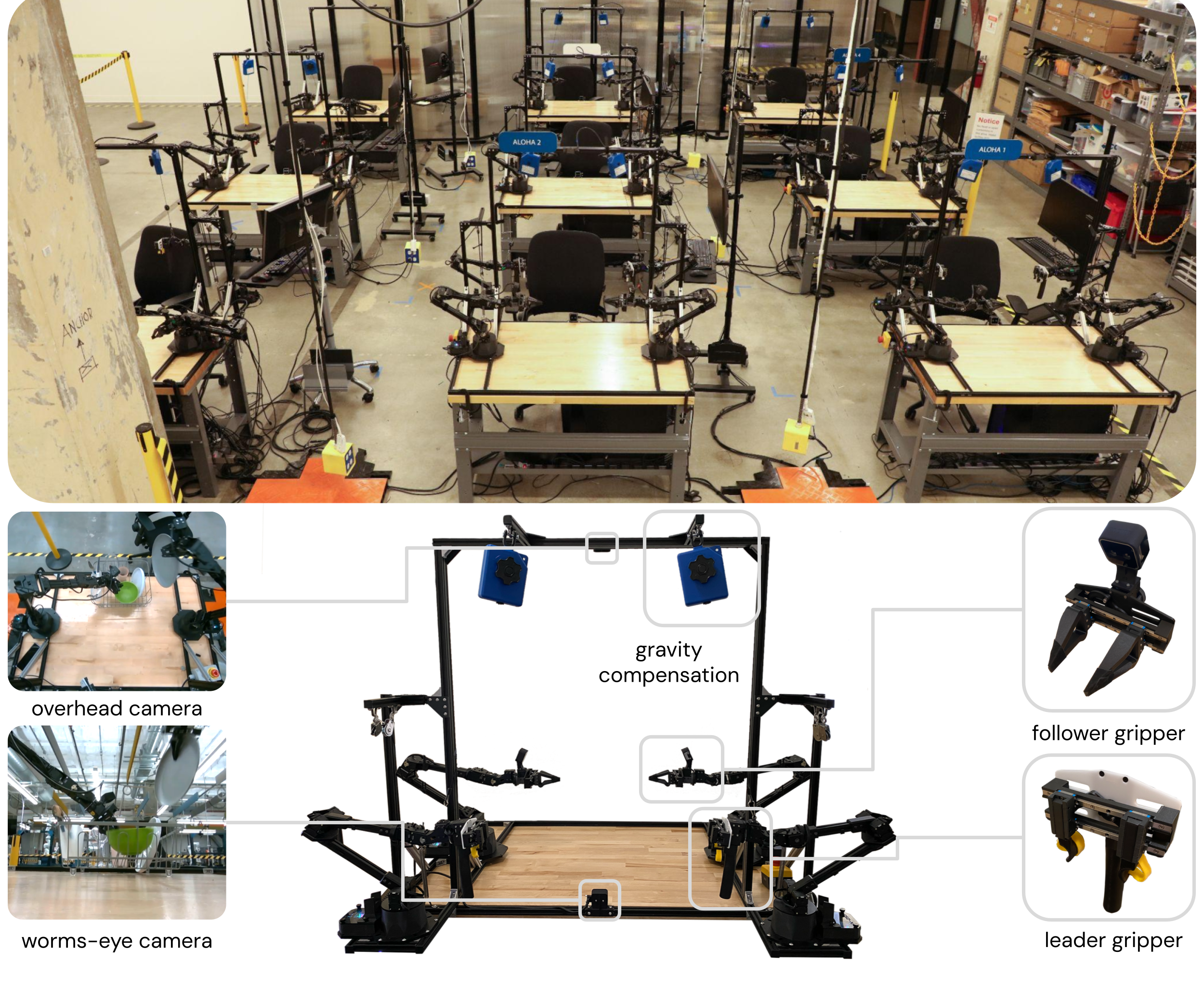
Dual-Arm System Overview
Popular Hardware Platforms
| System | Arms | DOF/arm | Price | Features |
|---|---|---|---|---|
| ALOHA | 2x ViperX 300 | 6+1 | ~$20K | Research gold standard |
| 2x SO-100 | 2x SO-100 | 6 | ~$500 | Most budget-friendly |
| Mobile ALOHA | 2x ViperX 300 + base | 6+1+2 | ~$32K | Mobile + manipulation |
| Franka Dual | 2x Franka Panda | 7+1 | ~$100K+ | Industrial-grade |
| ALOHA 2 | 2x ViperX 300 6S | 6+1 | ~$25K | Upgraded ALOHA |
System Structure in LeRobot
from lerobot.common.robot_devices.robots.manipulator import ManipulatorRobot
from lerobot.common.robot_devices.motors.feetech import FeetechMotorsBus
from lerobot.common.robot_devices.cameras.opencv import OpenCVCamera

def setup_dual_arm_robot():
    """Set up dual-arm system with LeRobot.

    System includes:
    - 2 leader arms (human-controlled)
    - 2 follower arms (task execution)
    - 3 cameras (top, left_wrist, right_wrist)
    """
    robot = ManipulatorRobot(
        robot_type="aloha",

        # Leader arms — human-controlled
        leader_arms={
            "left": FeetechMotorsBus(
                port="/dev/ttyACM0",
                motors={
                    "shoulder_pan": (1, "sts3215"),
                    "shoulder_lift": (2, "sts3215"),
                    "elbow_flex": (3, "sts3215"),
                    "wrist_flex": (4, "sts3215"),
                    "wrist_roll": (5, "sts3215"),
                    "gripper": (6, "sts3215"),
                },
            ),
            "right": FeetechMotorsBus(
                port="/dev/ttyACM1",
                motors={
                    "shoulder_pan": (1, "sts3215"),
                    "shoulder_lift": (2, "sts3215"),
                    "elbow_flex": (3, "sts3215"),
                    "wrist_flex": (4, "sts3215"),
                    "wrist_roll": (5, "sts3215"),
                    "gripper": (6, "sts3215"),
                },
            ),
        },

        # Follower arms — task execution
        follower_arms={
            "left": FeetechMotorsBus(
                port="/dev/ttyACM2",
                motors={
                    "shoulder_pan": (1, "sts3215"),
                    "shoulder_lift": (2, "sts3215"),
                    "elbow_flex": (3, "sts3215"),
                    "wrist_flex": (4, "sts3215"),
                    "wrist_roll": (5, "sts3215"),
                    "gripper": (6, "sts3215"),
                },
            ),
            "right": FeetechMotorsBus(
                port="/dev/ttyACM3",
                motors={
                    "shoulder_pan": (1, "sts3215"),
                    "shoulder_lift": (2, "sts3215"),
                    "elbow_flex": (3, "sts3215"),
                    "wrist_flex": (4, "sts3215"),
                    "wrist_roll": (5, "sts3215"),
                    "gripper": (6, "sts3215"),
                },
            ),
        },

        # Cameras
        cameras={
            "top": OpenCVCamera(camera_index=0, fps=30, width=640, height=480),
            "left_wrist": OpenCVCamera(camera_index=1, fps=30, width=640, height=480),
            "right_wrist": OpenCVCamera(camera_index=2, fps=30, width=640, height=480),
        },
    )

    return robot

robot = setup_dual_arm_robot()
robot.connect()
print("Dual-arm robot connected!")
Calibration: The Essential Step
Calibration is the most important step when setting up dual-arm systems. If calibration is wrong, leader and follower won't match, leading to poor quality data.
Calibration Procedure
def calibrate_dual_arm(robot):
    """Calibration procedure for dual-arm system.

    Step 1: Calibrate each arm individually
    Step 2: Calibrate coordinate frames between arms
    Step 3: Calibrate cameras
    """

    # === Step 1: Individual Arm Calibration ===
    print("=== Step 1: Individual Arm Calibration ===")
    print("Move each arm to its home position.")

    print("Left leader arm -> home position")
    input("Press Enter when ready...")
    left_home = robot.leader_arms["left"].read("Present_Position")
    print(f"Left leader home: {left_home}")

    print("Right leader arm -> home position")
    input("Press Enter when ready...")
    right_home = robot.leader_arms["right"].read("Present_Position")
    print(f"Right leader home: {right_home}")

    # === Step 2: Leader-Follower Mapping ===
    print("\n=== Step 2: Leader-Follower Mapping ===")
    print("Testing leader-follower sync...")

    for arm_name in ["left", "right"]:
        leader = robot.leader_arms[arm_name]
        follower = robot.follower_arms[arm_name]

        leader_pos = leader.read("Present_Position")
        follower.write("Goal_Position", leader_pos)

        import time
        time.sleep(0.5)
        follower_pos = follower.read("Present_Position")

        error = np.abs(np.array(leader_pos) - np.array(follower_pos))
        print(f"  {arm_name} arm sync error: {error.mean():.2f} "
              f"(max: {error.max():.2f})")

        if error.max() > 5.0:
            print(f"  WARNING: {arm_name} arm has high sync error!")

    # === Step 3: Camera Calibration ===
    print("\n=== Step 3: Camera Calibration ===")
    for cam_name, camera in robot.cameras.items():
        frame = camera.read()
        if frame is not None:
            print(f"  {cam_name}: {frame.shape} — OK")
        else:
            print(f"  {cam_name}: FAILED — check connection!")

    print("\nCalibration complete!")
    return True
Verifying Coordinate Frames
import numpy as np

def verify_coordinate_frames(robot):
    """Verify coordinate frames between left and right arms.

    Both arms must share the same coordinate frame (world frame)
    for bimanual coordination to work correctly.
    """
    test_point = np.array([0.3, 0.0, 0.2])

    print("Moving both arms to test point...")

    left_joints = inverse_kinematics(test_point, arm="left")
    right_joints = inverse_kinematics(test_point, arm="right")

    robot.follower_arms["left"].write("Goal_Position", left_joints)
    robot.follower_arms["right"].write("Goal_Position", right_joints)

    import time
    time.sleep(2.0)

    left_actual = robot.follower_arms["left"].read("Present_Position")
    right_actual = robot.follower_arms["right"].read("Present_Position")

    left_ee = forward_kinematics(left_actual, arm="left")
    right_ee = forward_kinematics(right_actual, arm="right")

    distance = np.linalg.norm(left_ee - right_ee)
    print(f"Left EE: {left_ee}")
    print(f"Right EE: {right_ee}")
    print(f"Distance: {distance*100:.1f} cm")

    if distance < 0.02:
        print("Coordinate frames OK!")
    else:
        print("WARNING: Coordinate frames may be misaligned!")

Action Space Design for Bimanual
Joint Space vs Task Space
| Approach | Action dim | Pros | Cons |
|---|---|---|---|
| Independent Joint | 2 x (6+1) = 14 | Simple, full control | Hard to coordinate |
| Coupled Joint | 14 (shared model) | Implicit coordination | Large action space |
| Task Space | 2 x 7 = 14 | Intuitive (xyz + rpy + grip) | Needs IK solver |
| Relative | 14 (base + delta) | Compact | More complex |
class BimanualActionSpace:
    """Action space design for dual-arm manipulation.

    Each arm: [x, y, z, rx, ry, rz, gripper] = 7D
    Total: 14D action space
    """

    def __init__(self, mode="independent"):
        self.mode = mode
        self.left_dim = 7
        self.right_dim = 7
        self.total_dim = 14

    def split_action(self, action: np.ndarray) -> tuple:
        """Split action into left and right components."""
        assert len(action) == self.total_dim
        left_action = action[:self.left_dim]
        right_action = action[self.left_dim:]
        return left_action, right_action

    def merge_observations(self, left_obs: dict, right_obs: dict) -> dict:
        """Merge observations from both arms."""
        merged = {}

        merged["observation.state"] = np.concatenate([
            left_obs["joint_positions"],
            left_obs["gripper_position"],
            right_obs["joint_positions"],
            right_obs["gripper_position"],
        ])  # Total: 14D

        merged["observation.images.top"] = left_obs["top_image"]
        merged["observation.images.left_wrist"] = left_obs["wrist_image"]
        merged["observation.images.right_wrist"] = right_obs["wrist_image"]

        return merged

    def apply_action(self, robot, action: np.ndarray):
        """Execute action on both arms simultaneously."""
        left_action, right_action = self.split_action(action)

        # IMPORTANT: Send commands simultaneously for sync
        robot.follower_arms["left"].write("Goal_Position", left_action[:6])
        robot.follower_arms["right"].write("Goal_Position", right_action[:6])

        robot.follower_arms["left"].write("Goal_Position",
                                           {"gripper": left_action[6]})
        robot.follower_arms["right"].write("Goal_Position",
                                            {"gripper": right_action[6]})
Data Collection for Bimanual Tasks
Collecting data for bimanual tasks is harder than single-arm because the operator must use both hands simultaneously:
def record_bimanual_dataset(robot, repo_id, num_episodes=50, fps=30):
    """Collect dataset for bimanual tasks.

    User controls 2 leader arms simultaneously,
    2 follower arms copy in real-time.
    """
    from lerobot.common.datasets.lerobot_dataset import LeRobotDataset

    dataset = LeRobotDataset.create(
        repo_id=repo_id,
        fps=fps,
        robot_type="aloha",
        features={
            "observation.images.top": {
                "dtype": "video",
                "shape": (480, 640, 3),
                "names": ["height", "width", "channels"],
            },
            "observation.images.left_wrist": {
                "dtype": "video",
                "shape": (480, 640, 3),
                "names": ["height", "width", "channels"],
            },
            "observation.images.right_wrist": {
                "dtype": "video",
                "shape": (480, 640, 3),
                "names": ["height", "width", "channels"],
            },
            "observation.state": {
                "dtype": "float32",
                "shape": (14,),
                "names": ["bimanual_joint_positions"],
            },
            "action": {
                "dtype": "float32",
                "shape": (14,),
                "names": ["bimanual_joint_targets"],
            },
        },
    )

    for ep in range(num_episodes):
        print(f"\nEpisode {ep+1}/{num_episodes}")
        print("Move leader arms to start position, then press Enter...")
        input()

        step = 0
        recording = True

        while recording:
            left_leader = robot.leader_arms["left"].read("Present_Position")
            right_leader = robot.leader_arms["right"].read("Present_Position")

            left_follower = robot.follower_arms["left"].read("Present_Position")
            right_follower = robot.follower_arms["right"].read("Present_Position")

            top_image = robot.cameras["top"].read()
            left_wrist_image = robot.cameras["left_wrist"].read()
            right_wrist_image = robot.cameras["right_wrist"].read()

            state = np.concatenate([left_follower, right_follower])
            action = np.concatenate([left_leader, right_leader])

            robot.follower_arms["left"].write("Goal_Position", left_leader)
            robot.follower_arms["right"].write("Goal_Position", right_leader)

            dataset.add_frame({
                "observation.images.top": top_image,
                "observation.images.left_wrist": left_wrist_image,
                "observation.images.right_wrist": right_wrist_image,
                "observation.state": state,
                "action": action,
            })

            step += 1
            if step > 500:
                recording = False

        dataset.save_episode()
        print(f"  Saved episode {ep+1} ({step} frames)")

    dataset.push_to_hub()
    return dataset
Two-Handed Teleop Tips
# Tips for bimanual teleop operators
TELEOP_TIPS = {
    "practice_first": "Practice without recording first. Need at least 30 minutes to get comfortable controlling 2 arms simultaneously.",
    "consistent_speed": "Keep consistent speed. Don't move too fast — policies struggle to learn from movements >0.5 rad/s per joint.",
    "one_arm_lead": "Let one arm lead (e.g., right holds object), the other supports. Avoid moving both arms simultaneously unless necessary.",
    "pause_between_phases": "Brief pause (~0.5s) between phases (approach, grasp, manipulate). Helps policy recognize transitions.",
    "filter_episodes": "Record 20% extra episodes as buffer. Filter out poor quality episodes (collisions, bad timing, etc.) after recording.",
}
LeRobot Config for Bimanual Setup
from lerobot.common.policies.act.configuration_act import ACTConfig

bimanual_act_config = ACTConfig(
    input_shapes={
        "observation.images.top": [3, 480, 640],
        "observation.images.left_wrist": [3, 480, 640],
        "observation.images.right_wrist": [3, 480, 640],
        "observation.state": [14],  # 7 joints per arm x 2
    },
    output_shapes={
        "action": [14],  # 7 targets per arm x 2
    },
    input_normalization_modes={
        "observation.images.top": "mean_std",
        "observation.images.left_wrist": "mean_std",
        "observation.images.right_wrist": "mean_std",
        "observation.state": "min_max",
    },
    output_normalization_modes={
        "action": "min_max",
    },

    chunk_size=100,
    n_action_steps=100,
    dim_model=512,
    n_heads=8,
    n_layers=4,       # More layers for coordination
    use_vae=True,
    latent_dim=32,
    kl_weight=10.0,
    vision_backbone="resnet18",
    pretrained_backbone=True,
)
Reference Papers
- ALOHA: Learning Fine-Grained Bimanual Manipulation with Low-Cost Hardware — Zhao et al., RSS 2023 — Original ALOHA paper
- Mobile ALOHA: Learning Bimanual Mobile Manipulation with Low-Cost Whole-Body Teleoperation — Fu et al., 2024 — ALOHA + mobile base
- ALOHA 2: An Enhanced Low-Cost Hardware for Bimanual Teleoperation — Aldaco et al., 2024 — Upgraded ALOHA version
Conclusion and Next Steps
Dual-arm setup demands careful calibration and action space design. Key takeaways:
- Calibration must be done precisely — 1 degree error accumulates into large misalignment
- 14D action space is large but ACT handles it well through chunking
- Two-handed teleop requires practice — don't rush data collection
The next post — Bimanual Tasks: Folding, Pouring & Assembly — will put the dual-arm system to work on practical tasks like towel folding, water pouring, and assembly.
Related Posts
- Bimanual Manipulation Overview — Overview of bimanual manipulation
- Training Single-Arm Policies — Foundation before dual-arm
- Long-Horizon Tasks — Planning for complex tasks